


Apple promises that its newest line of 14-inch and 16-inch MacBook Pro is the fastest yet, thanks to the M1 Pro and M1 Max processors. And to date, the MacBook Pro 14 is considered one of the best laptops for creative professionals and music production money can buy.
Besides the new screen size and M1 chips, let’s review other updates and modifications below.
MacBook Pro 14 Review: Design
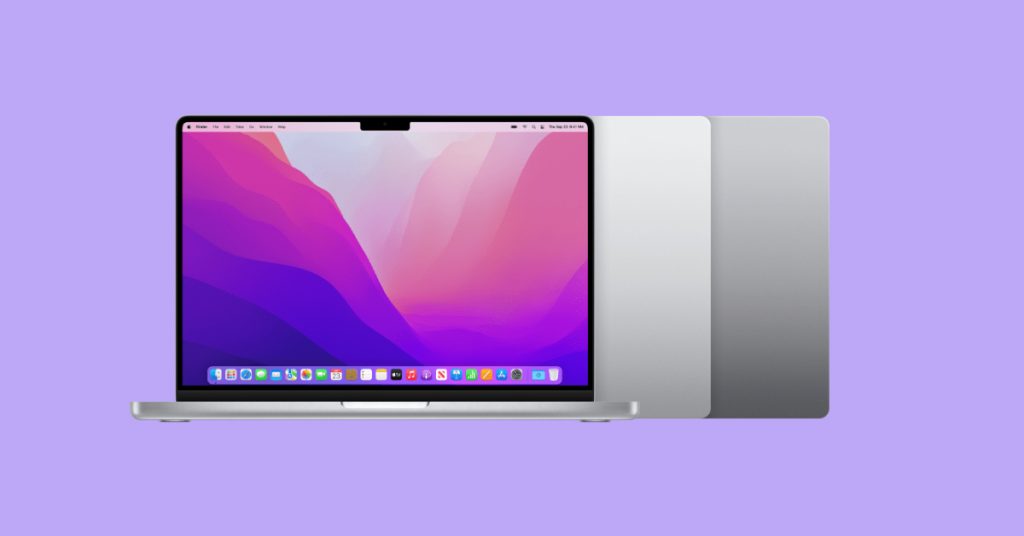
As the title suggests, size options for the new MacBook Pro have been updated. It appears that Apple decided to replace its 13.3-inch and 15.4-inch lines with a 14.2-inch version at the end of 2021. And many Mac users thought it was a great move. The new MacBook 14 measures 12.3 inches (W) x 8.7 inches (D) x 0.6 inches (H) and weighs only 3.5 pounds, making it ultra-portable and aggressively competitive.
Traditionally rounded edges look and feel sleek, and the Apple logo on the back appears to be slightly bigger. Another update is the notch at the top of the front bezel for the built-in web camera.
The keyboard has also been updated. It features all-black keys with a row of Function keys atop, in place of the Touch Bar. Yes, the new Mac doesn’t have the Touch Bar, and we can’t say we’ll miss it.
As far as color options go, Apple decided to stick with the traditional Silver and Space Gray.
Overall, the new MacBook Pro 14 has a solid look, and we can’t really fault it.
MacBook Pro 14 I/O Ports
Lo and behold, Mac users got their options back. The 2021 MacBook Pro 14 has full-size HDMI and SD card reader ports. It also comes with three Thunderbolt 4 ports for charging, file transfers (up to 40 GB/s), USB 4, and can be used as a DisplayPort.

Traditionally, it also has a 3.5 mm headphone jack and the MagSafe 3 port.
And while we certainly can appreciate added variety, the laptop could use a USB-A port, no doubt.
14-inch Display
The addition of the 14.2-inch screen is one of the most significant design changes. And Apple used this extra space very efficiently. The new model offers a significantly larger viewing area than the 2020 MacBook Pro 13-inch.
The new display also offers a higher resolution of 3024 x 1964 and a 254-pixel density (PPI). In addition, the panel is a Liquid Retina XDR, with up to 1000 nits of sustained brightness, 1600 nits of peak brightness, and a 1,000,000:1 contrast ratio.
Thanks to these upgrades, MacBook Pro 14 users can enjoy even crisper and sharper images.
MacBook Pro 14 Review: Performance
As mentioned above, the latest MacBook Pro models are powered by Apple M1 Pro and M1 Max processors.
While the M1 Pro is considered a mid-tier CPU, it is considerably faster than its M1 chip predecessor. But it is the M1 Max that’s regarded as the most powerful chip. Thanks to 10 CPU cores, up to 32 GPU cores, and a 16-core Neural Engine, M1 Max runs twice as fast as its M1 Pro counterpart. In addition, M1 Max comes with a dedicated media engine for decoding and two for encoding. As a result, the processor allows for up to two times faster video encoding. Thanks to the two ProRes accelerators, the new MacBook Pro 14 offers even higher multi-stream performance.
Users can run multiple power-hungry programs and applications without any slowdown.
The 14-inch MacBook Pro model comes with both M1 Pro and M1 Max CPU options, as well as 16GB or 32GB of RAM, and 512GB or 1TB SSD options. All these options are onboard and cannot be upgraded later.
Battery Life
According to Apple, the MacBook Pro 14 yields up to 17 hours of video playback and up to 11 hours of continuous web surfing. The manufacturer achieved this superior battery performance thanks to Apple silicon technology. And the model performs equally well regardless of whether it is plugged into a power outlet.
The MacBook Pro 14 supports fast charging, which means the laptop’s battery can charge from half full to full in about 30 minutes.
Options and Pricing
Like any Apple computer, the newly released MacBook Pro 14 isn’t cheap. The base model, with an M1 Pro 8-Core CPU, 16GB of RAM, and a 512GB SSD, starts at $ 1,999, or $166.58 per month in 12 monthly installments.
Adding the M1 Max 10-core CPU option (with a 32-core GPU and 16-core Neural Engine) will cost you an additional $700. But a faster processor also allows you to add up to 64GB of RAM. And if you choose to max out all the options (M1 Max, 64GB RAM, 8TB SSD), the price of your MacBook Pro 14 can reach up to $ 5,899. Ouch.
As we noted earlier, the model comes in two color options: Space Gray and Silver.
The Resale Value of a Used MacBook Pro
The good news is that Apple allows you to trade in your older Mac devices to offset the cost of your new MacBook Pro 14. However, if you are on the fence about spending the kind of money on a laptop, Dell, MSI, HP, Asus, Razer, and many other brands can match Apple’s computing power and offer a dedicated GPU for half the cost. And you can always sell your MacBook Pro for cash to put towards a new PC laptop.
But whether you are selling your pre-owned Mac or trading it in, be sure to sign out of your iCloud, reset your system to factory defaults, and clean it up to maximize your return. Our “8 Things To Do Before Selling Your MacBook Pro” blog post walks you through the preparation process in greater detail.
Bottom Line
We think Apple might have just hit the sweet spot with their 14-inch model because of the added viewability that does not compromise portability. But, unfortunately, this beautiful laptop comes with a steep price tag. And those who need a lot of power and speed, prepare to spend extra on the M1 Max-based model, as it fares so much better when it comes to graphic design and other creative tasks. In any case, we hope our Apple MacBook Pro 14 review will help you make an educated purchase.