


When buying a new laptop, you’re faced with a flood of technical specs. Since most laptops today can’t be easily upgraded, choosing the right configuration from the start is critical. Among the most important choices is the display, as it directly impacts everything you do, from work and web browsing to gaming and streaming.
You’ve likely seen acronyms like FHD, QHD, and UHD, and it can be confusing to know which is best for you. In this guide, we’ll compare the two most common high-resolution options: FHD (Full HD) and UHD (Ultra HD, also known as 4K). We’ll explore their advantages and disadvantages to help you make an educated choice.
And if you’re a serious gamer, we also suggest checking out our post on QHD vs. FHD for gaming laptops to dive even deeper.
FHD vs. UHD: Decoding the Acronyms
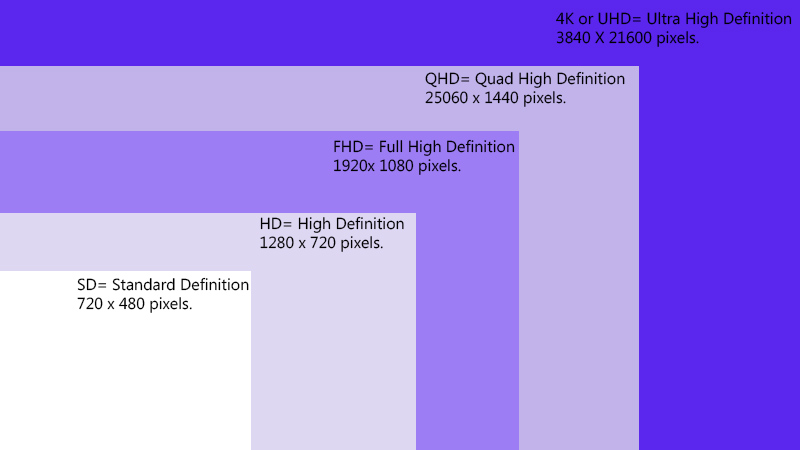
Before we dive in, let’s figure out what a “screen resolution” is and why it matters. The display resolution indicates the maximum number of pixels a panel can show horizontally and vertically. You may have come across all kinds of acronyms for screen resolution, and it is not always clear which one is which. So let’s go through the most popular ones:
- SD: 720 x 480 pixels
- HD: 1280 x 720 pixels
- FHD: 1920 x 1080 pixels
- QHD: 2560 x 1440 pixels
- WQHD: 3440 x 1440 pixels
- UHD: 3840 x 2160 pixeles.
FHD (Full High Definition / 1080p)
FHD, or 1080p, has become the gold standard for most laptops, and for good reason. With 1920 columns and 1080 rows of pixels, it provides a crisp, clear image that is perfect for everyday tasks. It strikes an excellent balance between delivering sufficient visual quality for most users without draining the battery or requiring an ultra-powerful (and expensive) graphics card.
UHD (Ultra High Definition / 4K)
UHD, also commonly referred to as 4K, boasts a massive pixel array of 3840 x 2160. That’s nearly 8.3 million pixels in total—four times the amount of an FHD screen. This huge leap in pixel density results in an incredibly sharp, vivid, and detailed image. For content creators, photographers, and videographers who demand pristine color accuracy and clarity, a 4K UHD display is often essential.
FHD vs. UHD: A Head-to-Head Comparison
| Feature | FHD (1920 x 1080) | UHD (3840 x 2160) | The Winner Is… |
| Image Clarity & Detail | Good. Sharp enough for most daily tasks and general use. | Exceptional. Noticeably sharper text, more detailed images, and a more immersive experience. | UHD |
| Price | More affordable. Widely available in budget-friendly and mid-range laptops. | A premium feature. Laptops with 4K screens are significantly more expensive. | FHD |
| Battery Life | Better. Fewer pixels to power means less strain on the battery. | Worse. Powering 8 million+ pixels drains the battery much faster. | FHD |
| Gaming Performance | Excellent. Easier for graphics cards to run, allowing for higher frame rates (smoother gameplay). | Demanding. Requires a powerful, high-end graphics card to run modern games smoothly at native resolution. | FHD |
Which Resolution Is Better For You?
The right choice depends entirely on how you use your laptop.
For Everyday Tasks & General Use
For internet surfing, writing emails, watching YouTube, and office work, an FHD (1080p) screen is more than enough. It provides a great viewing experience while saving you money and extending your battery life.
For Gamers
While a 4K image looks stunning, FHD is the better choice for most gamers. Gaming is a balance between resolution and frame rate (also known as refresh rate). An FHD display allows even mid-range graphics cards to push high frame rates in AAA titles like Dota or Call of Duty, ensuring smooth, responsive gameplay without screen tearing.
For Content Creators & Media Professionals
For video editing, graphic design, photography, or anyone who needs to see the maximum amount of detail and color accuracy, UHD (4K) is the clear winner. The extra screen real estate and pixel density make a tangible difference in professional creative workflows.
Bottom Line
Choosing between FHD and UHD is a trade-off.
- Go with FHD (1080p) if you prioritize battery life, smooth gaming performance, and your budget. It’s the best-balanced option for most users.
- Opt for UHD (4K) if you are a creative professional who requires maximum visual fidelity and detail, or if you want the most premium media-viewing experience and are willing to pay the cost in both terms of cost and battery life.
Once you’ve chosen the perfect new laptop, you might wonder what to do with your old one. If you have an unwanted device, we at Gadget Salvation can help! We guarantee a hassle-free and quick laptop trade-in experience, putting cash in your pocket. Just visit our homepage to calculate an instant offer to get started.