


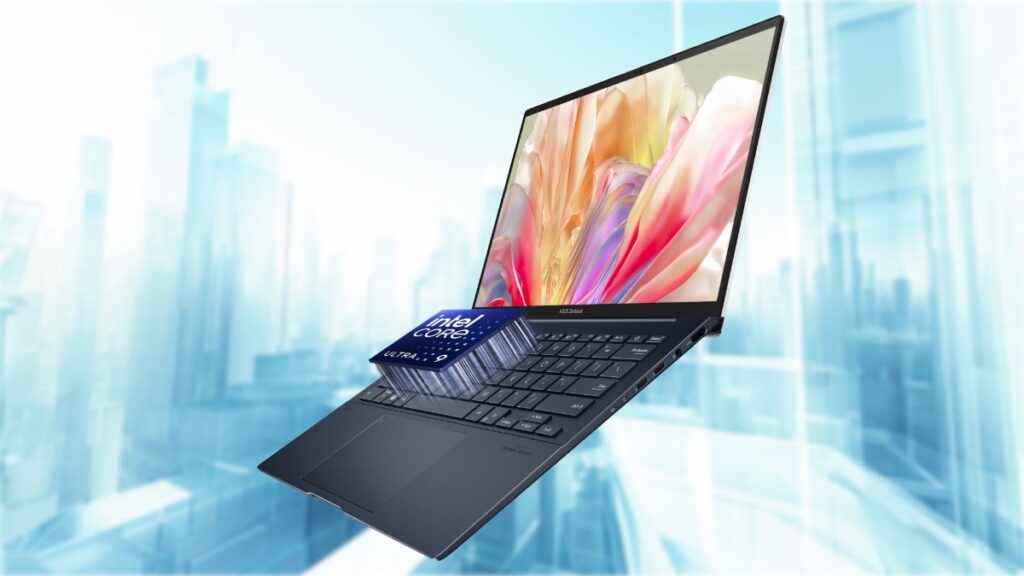
The 2025 laptop market is filled with slim and ultra-portable laptop models that aren’t MacBook Airs. But selecting one that sports all the premium features while maintaining a low-profile, sustainable design can still be challenging. When researching ultrabooks, the Asus Zenbook 14 always comes up. And the brand’s latest UX3405CA-PS99T release may just be the model that ticks all the boxes. stunning OLED display, Intel’s latest Core Ultra processor, and a sleek magnesium-aluminum chassis — all in a package that’s perfect for professionals, students, and eco-conscious tech users.
⚙️ Key Specifications at a Glance
| Feature | Details |
|---|---|
| Processor | Intel Core Ultra 9 285H (Series 2) with 16 cores and 16 threads |
| Display | 14″ 3K OLED touchscreen (2880×1800), 120Hz refresh rate, 500 nits, Pantone-validated colors |
| Graphics | Intel Arc Graphics with AI Boost NPU |
| RAM | 32GB LPDDR5X (on board) |
| Storage | 1TB M.2 NVMe PCIe Gen 4 SSD |
| Battery | 75Wh 4-cell, ~9 hours real-world use |
| Weight | 2.82 lbs (1.28 kg) |
| Ports | 1x USB 3.2 Gen 1 Type-A 2x Thunderbolt 4 with support for display/power delivery (data speed up to 40Gbps) 1x HDMI 2.1 TMDS 1x 3.5mm Combo Audio Jack |
| OS | Windows 11 Pro |
Asus UX3405CA-PS99T Design: A Study in Ultrabook Refinement
The Zenbook 14 is described as sleek, light, and compact, featuring a Foggy Silver aluminum chassis with a stylized lid design. Its physical dimensions are 0.59 by 12.3 by 8.7 inches (1.49 x 31.24 x 22.01 cm), and it weighs a mere 2.82 lbs (1.28 kg), which firmly establishes it as a true ultraportable computer. Its construction has been subjected to and has passed MIL-STD-810H durability tests, indicating a high degree of resistance to travel hazards such as shock and vibration. The hinge, which runs the length of the display, is noted for its durability and ability to allow for smooth, single-handed opening of the laptop.
CPU and General Performance
The Intel Core Ultra 9 285H, part of the new Arrow Lake-H series, is a powerhouse for an ultrabook. The system as a whole scores high in general productivity and content creation benchmarks:

However, while the Geekbench performance is outstanding, its real-world utility is more nuanced. For example, professional editors reported slower video conversion times compared to even older ultrabook models, like the 2023 Lenovo Yoga 9i or Acer Swift X 14. This suggests that not all workloads benefit equally from the raw CPU power, possibly due to power management or thermal throttling in sustained tasks.
The UX3405CA is also an AI-ready laptop with a built-in Intel AI Boost NPU capable of up to 13 TOPS. The inclusion of a dedicated Neural Processing Unit (NPU) is a fundamental shift in computing architecture. The NPU is designed to offload AI-specific workloads from the CPU and GPU, which has two significant ripple effects. First, it enhances power efficiency for tasks such as Windows Studio Effects and AI-based noise cancellation, potentially extending battery life for video conferencing and other AI-centric applications. Second, the NPU ensures the laptop is compatible with emerging AI software frameworks, such as OpenVINO and DirectML, making it a more viable purchase for the long term as AI integration becomes standard in operating systems and applications.
Graphics Usage
The integrated Intel Arc 140T graphics is very promising. In fact, many call it the fastest iGPU technology on the market presently. This GPU delivers quite respectable performance in light to moderate gaming, with frame rates of 52 frames per second (fps) in Sid Meier’s Civilization VI: Gathering Storm and 26 fps in Borderlands 3. The high 120 Hz refresh rate of the screen is more beneficial for providing smooth visuals and scrolling than for high-twitch gaming.
OLED Display: Vivid, Responsive, and Creator-Ready
The 14-inch ASUS Lumina OLED display is widely considered a highlight of this laptop. It offers rich contrast, deep blacks, and vibrant colors — ideal for photo editing, streaming, and presentations. With 500 nits peak brightness and Pantone validation, it’s a standout for visual professionals.
At the same time, there is a potential for image persistence or burn-in. The brand addresses this with ASUS OLED Care features, including burn-in prevention algorithms and panel protection. The company recommends mitigating this risk by using Dark Mode, enabling animated screensavers, and adjusting brightness to match ambient lighting, which are important for maximizing the display’s lifespan.
Inputs, Audio, and Peripherals: The Day-to-Day User Experience
Beyond core performance, the daily user experience is significantly shaped by the quality of the keyboard, touchpad, and other features:
Keyboard and Touchpad
The UX3405CA-PS99T’s keyboard is widely praised as a standout feature. It delivers almost unmatched precision, responsiveness, and offers better key travel (1.4 mm) compared to some previous Zenbook models, making this model a great choice for long typing sessions. The keyboard is equipped with bright white LED backlighting with four levels of brightness. The “diving board” glass touchpad delivers a perfect tactile feel with a satisfying click. Additionally, it is paired with the innovative NumberPad 2.0 feature, integrated into the touchpad surface, which doubles as a numeric keyboard.
Webcam and Audio
The laptop is equipped with an FHD (1080p) webcam that includes an IR sensor for password- and PIN-free logins with Windows Hello. It also features a physical privacy shutter. The bottom-mounted dual speakers are considered above average, delivering clear vocals and instruments without distortion, although they are noted to lack significant bass. The audio experience is enhanced by Dolby Atmos software and AI noise-canceling input features.
Connectivity and Ports
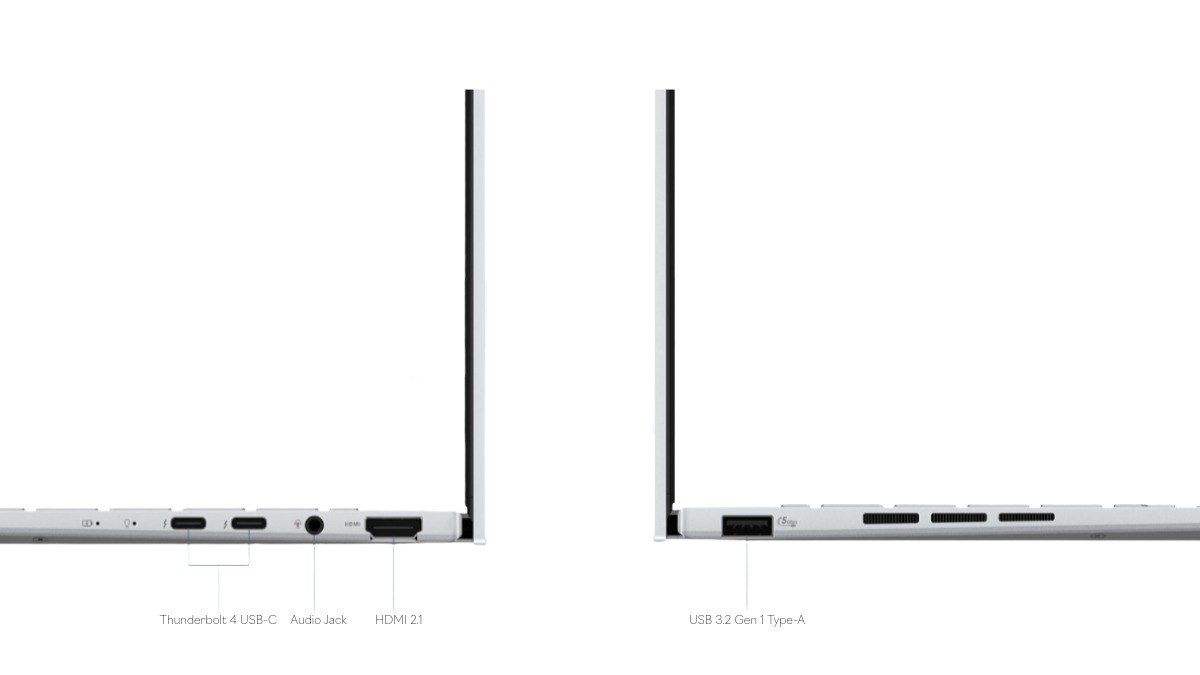
For a narrow-profile ultrabook, this Asus Zenbook model offers an impressive combo of the latest and legacy ports:
- 2× Thunderbolt 4 (USB-C)
- 1× USB-A 3.2 Gen 1
- 1× HDMI 2.1
- 1× 3.5mm audio jack
- Wi-Fi 6E and Bluetooth 5.3.
Points of Weakness: Battery Life and Thermals

The UX3405CA-PS99T model features a 75Wh Li-ion battery with fast charging capabilities, achieving 60% charge in under 50 minutes via a 65W USB-C power supply. However, the battery life of the Zenbook 14 is one of its most contested points. While ASUS claims 18 hours of usage on a single charge, in reality, it yields just a little over 9 hours total (which is still not bad, honestly).
Many users also reported overheating and an audible fan, especially in Performance mode. The fan always spins, even during light use, like checking the inbox or very basic web surfing.
Zenbook 14 UX3405CA-PS99T Price and Resale Value Potential
The manufacturer’s suggested retail price (MSRP) for the Zenbook 14 UX3405CA-PS99T is listed at $1,399.99. However, the price varies significantly across different retailers, ranging from a low of $1,050 on sale to as high as $1,578.99. At this price point, the Zenbook 14 offers a compelling blend of top-tier performance, a superior display, and premium features, making it a strong value proposition, especially if purchased on sale.
And while it is perhaps a little premature to discuss the resale pricing for the UX3405CA, based on the data for the previous Zenbook 14 OLED models, we can confidently say that they retain salvage value quite well. So, if you are planning to upgrade, consider using Gadget Salvation — a trusted online platform for reselling pre-owned tech, with over a decade of experience in buyback and refurbishment. With us, you can sell used Asus laptops or other brands and devices while enjoying free shipping and easy, eco-friendly repurposing that keeps dated electronics out of landfills.
ASUS Zenbook 14 UX3405CA-PS99T Review Summary
| ✅Pros | ⚠️Cons |
| Exceptional 3K 120Hz OLED Display: The display is a major highlight, offering stunning colors, deep blacks, high contrast, and smooth motion. It’s excellent for both content creation and media consumption. | Thermal and Fan Noise: The laptop can run hot under sustained heavy loads, and the fan can become quite noisy, even during some lighter tasks. |
| Strong Performance: The Intel Core Ultra 9 285H processor and Intel Arc Graphics provide powerful performance for an ultrabook, handling daily tasks, multitasking, and light creative work or gaming. | Mediocre Battery: The battery life is decent, but it may not last a full workday for all users. It definitely falls short of the 18-hour claims. |
| Premium Design & Portability: The laptop is sleek, compact, and lightweight (2.82 lbs), making it an excellent option for users who need to be mobile. | Soldered RAM: The 32GB of RAM is soldered to the motherboard, meaning it is not upgradeable. Users must choose the correct configuration at the time of purchase. |
| Excellent Inputs: The keyboard offers a comfortable typing experience, and the large, responsive glass touchpad is a pleasure to use. | |
| Comprehensive Connectivity: Includes a good selection of modern ports, including two Thunderbolt 4 ports, which adds to its versatility. |
Conclusion & Final Recommendation
The ASUS Zenbook 14 UX3405CA-PS99T is a powerful and highly capable ultrabook with a beautiful OLED display and strong performance. It will work out great for professionals and power users who require a portable notebook capable of handling demanding tasks. However, buyers should be aware of the potential for increased heat and fan noise under load, as well as the fact that the RAM is not upgradeable.
A final recommendation:
- This laptop is an excellent choice for: Professionals, developers, or content creators who require a powerful and portable machine for intensive but non-gaming tasks. It is ideal for those who value a stunning display and a great keyboard and are willing to tolerate fan noise under load or manage power profiles to maintain quiet operation. This is a high-performance ultrabook best suited for those who primarily work indoors with access to power.
- Consider an alternative if: A user’s primary concern is long, consistent battery life for all-day use away from an outlet, or if they are highly sensitive to fan noise. For users who prioritize efficiency over raw power, the AMD variant of the Zenbook 14 may be a more suitable choice.
Lastly, whether you choose to buy the UX3405CA or any one of its rivals, please be mindful of your current electronics. If you are not going to use them, Gadget Salvation can help you recycle unwanted technology responsibly.