



Are you wondering what kind of MacBook Pro you own? Whether you’ve had your Mac for a while or just got it recently, accurately knowing what type of model and generation will help when troubleshooting or investigating upgrades to enhance its performance.

And identifying your MacBook model is surprisingly simple if you follow the proper steps. In this blog post, we’ll cover everything you need to know about figuring out which Apple MacBook Pro you own from the serial number on the bottom case of your laptop,p all the way down to details revealed in software updates. So, let’s get started!
Why It’s Important to Know Your MacBook Model?
If you are a proud owner of a MacBook Pro, it is crucial to know precisely which model you have.
This information can help you:
- Make the most of your device.
- Troubleshoot any issues that may arise.
Whether you have a brand-new Apple MacBook Pro or an older model, identifying it is essential for proper maintenance, upgrading, and maximizing its resale value.
For example, if you’re looking to sell your MacBook Pro, Gadget Salvation can help you with this challenging task. After identifying your model, select a suitable MacBook from the category and choose the cosmetic condition and functionality to receive an instant quote. If you agree with the price, you can send your MacBook to us and receive cash upon receipt of the device.
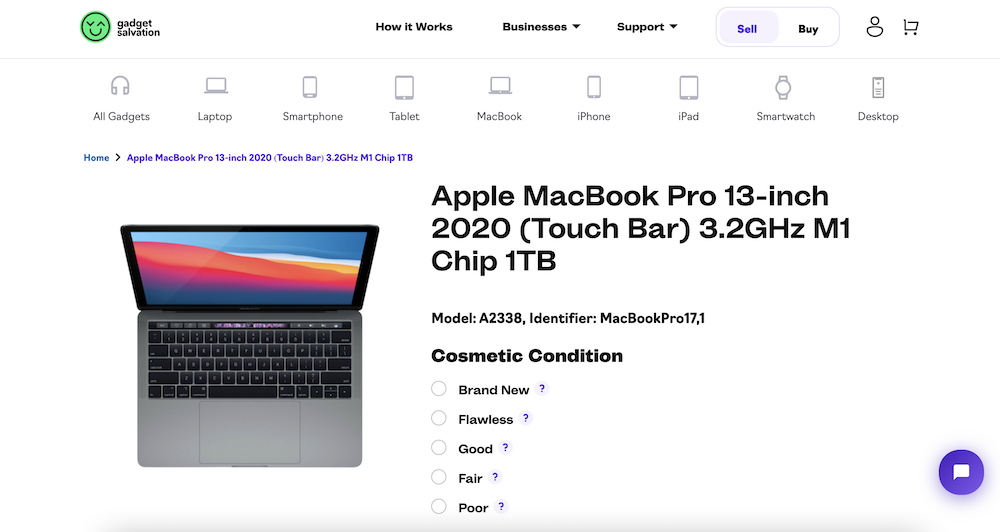
Knowing your Apple Mac model can help you troubleshoot issues that may arise while using your device. Different MacBooks may have varying hardware components, which can lead to different problems. Therefore, if you encounter any issue with your MacBook, knowing the specific model you own can help you find relevant solutions quickly and efficiently.
It helps you determine the compatibility of software and accessories that you can use with your MacBook. For instance, some software applications may not be compatible with older models, and certain accessories may not be compatible with newer ones.
Step-by-step guide on how to find your MacBook Pro model
Finding the exact model of your MacBook Pro can be challenging, and there are different methods to do so, depending on the model.
However, the most straightforward way is to check the Apple menu. You can do this by clicking on the Apple icon on the top left corner of your screen and then clicking on “About This Mac.”
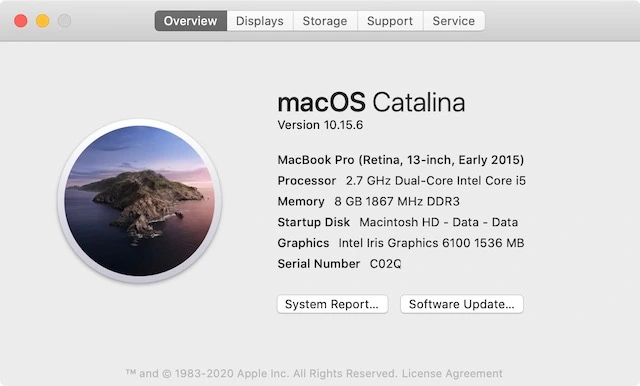
This will open up a window where you can see the basic specifications of your MacBook Pro, including the model name, processor, memory, and serial number.
MacBook Pro Models and Their Key Features
There are several models available, ranging from the latest 2023 models to those first introduced in 2006. In this section, we will give a brief overview of the latest MacBook Pro models and their key features:
- MacBook Pro (13-inch, M1, 2020): This model features Apple’s powerful M1 chip, which offers exceptional performance and battery life. It also has a Retina display, Touch ID, and Thunderbolt 3 ports.
- MacBook Pro (16-inch, M1 Pro, 2021): This laptop is designed for power users who require more processing power and memory for demanding tasks, such as video editing and gaming. It also features a larger 16-inch Retina display and an improved camera. You can read the full review here.
- MacBook Pro (16-inch, M1 Max, 2021): This is the most powerful MacBook Pro model to date, boasting an M1 Max chip that takes performance to new heights. With up to 64GB of memory and a dedicated GPU, this device is a powerhouse for creative professionals who require the maximum power possible.
- MacBook Pro 16-inch M2 2023: It features a 12-core CPU that enables you to edit and sort thousands of images, as well as play multiple 4K streams. The M2-based model features a liquid Retina XDR display and up to 18 hours of battery life. Its exceptional performance and speed are perfect for creative professionals working with complex editing software.
Tips for Identifying Older MacBook Pro Models
If you have an older MacBook Pro model, finding its exact model may require more digging. Here are some tips that can help you identify your MacBook Pro:
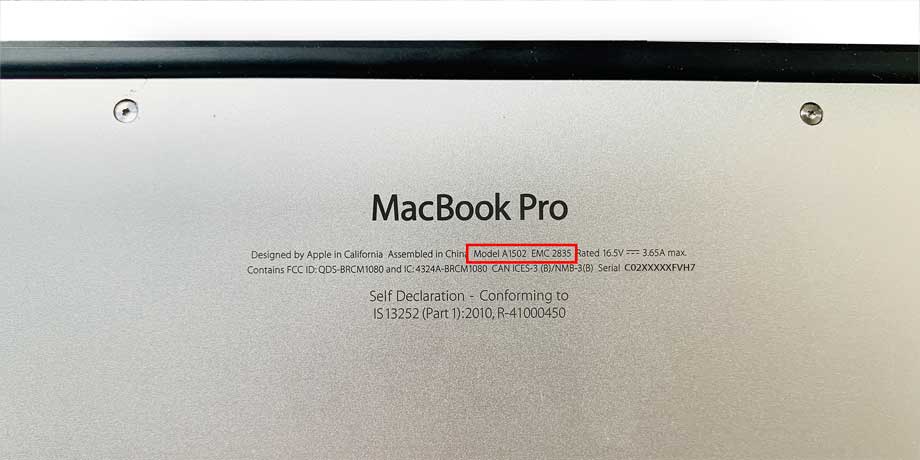
- Checking the model number on the bottom of the device: All MacBook Pro models feature a model number on the bottom of the device. This number can be used to identify the device, and it is usually in the format of “A****”
- Identifying the model using its EMC number: Another way to identify the MacBook Pro model is by using its EMC number. This is a unique number assigned to each device model, which can be found at the bottom of the device, near the model number.
- Using the serial number to identify the MacBook Pro model: If the above methods do not work, you can also use the serial number to identify your MacBook Pro model. This information can be found in “About This Mac” and accessed through Apple’s support website to view your device’s specifications.
Conclusion
If you find yourself asking, “What MacBook Pro do I have?” it does not take long to figure it out. Taking note of your exact model number is essential for getting the most out of your device, should you choose to resell or upgrade it. Whether you need to troubleshoot an issue or want to upgrade your computer, knowing the model can also help you save time and money.
We hope this guide has offered some helpful tips for identifying your MacBook Pro model, from the latest models to older ones. With this knowledge, you can make more informed decisions about your device and get the most out of it.
Lastly, if you want to sell your pre-owned Apple laptop, please reset it beforehand.

Anastasiia’s writing distills complex technology topics into clear, compelling content. With a background in software development and a passion for emerging tech, she specializes in creating everything from in-depth white papers on AI ethics to engaging blog posts about the latest in quantum computing. Her work helps a wide audience, from tech-savvy professionals to curious newcomers, understand how technology shapes our world.