


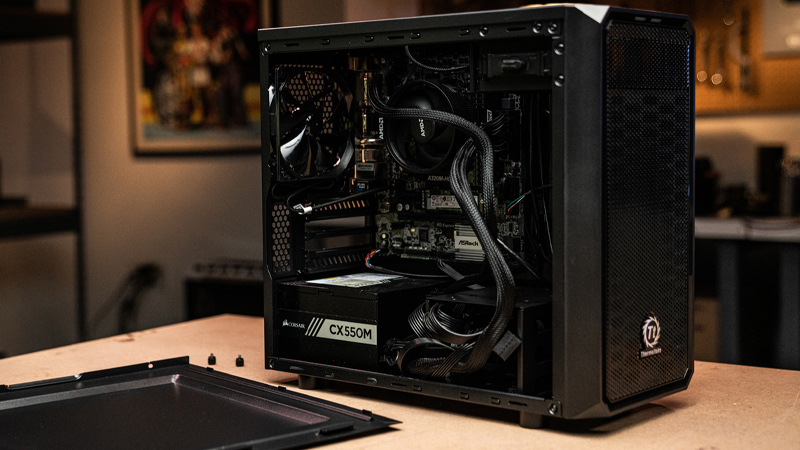
Building a gaming PC can be exciting, but understanding the hardware necessary to create a powerful and efficient system is required. Each part, from the CPU to the graphics card, plays a crucial role in delivering the ultimate gaming experience. This post explores the key components you need to build a gaming PC and how they contribute to performance.
Gaming PC: Essential Components
When building a gaming PC, there are several critical components you will need:
- CPU (Central Processing Unit): The brain of your PC, responsible for executing instructions and processing data. A powerful CPU ensures smooth gameplay and efficient multitasking.
- GPU (Graphics Processing Unit): Handles rendering images, videos, and animations. A high-performance GPU is essential for running modern games at high settings.
- RAM (Random Access Memory): Provides the necessary memory for your system to run applications and games smoothly. At least 16GB is recommended for gaming.
- Storage: SSDs (Solid State Drives) offer faster load times and improved performance over traditional HDDs (Hard Disk Drives).
- Motherboard: Connects all components and allows them to communicate. Ensure compatibility with your CPU and other parts.
- Power Supply Unit (PSU): Provides power to your PC. Choose a reliable PSU with enough wattage to support your components.
- Cooling System: Keeps your PC from overheating. Options include air cooling and liquid cooling systems.
- Case: Houses all your components. Consider size, airflow, and aesthetics.
Choosing the Right CPU for Gaming
Choosing the right processor is crucial for gaming performance. Look for a CPU with a high clock speed and multiple cores to handle demanding games. Popular choices include Intel’s Core i7 and Core i9 series, as well as AMD’s Ryzen 7 and 9 processors. Ensure compatibility with your motherboard and consider future-proofing your build by opting for a slightly more powerful CPU than currently needed.
Why is a Good GPU So Important?
The GPU is vital for rendering graphics and ensuring smooth gameplay. A powerful GPU allows you to play games at higher resolutions and settings. NVIDIA’s GeForce RTX and AMD’s Radeon RX series are popular among gamers. When selecting a GPU, consider the types of games you play and the resolution you want to achieve. A good GPU can significantly enhance your gaming experience.
How Much RAM Do I Need for Gaming?
RAM memory is essential for running games and applications smoothly. 16GB would be an absolute minimum sufficient for gaming, while 32GB can provide a buffer for future-proofing and multitasking. Ensure your motherboard supports the RAM type and speed you choose. Faster RAM can improve performance, but the difference is often minimal compared to upgrading other components like the CPU or GPU.
Storage Considerations
Storage affects load times and overall system responsiveness. SSDs are faster and more reliable than HDDs, making them the preferred choice for gaming PCs. Consider a combination of SSD for your operating system and games, and an HDD for additional storage. NVMe SSDs offer even faster speeds than SATA SSDs, providing a noticeable improvement in load times.
Frequently Asked Questions
The motherboard connects all your components and allows them to communicate. It determines the compatibility of your CPU, RAM, and other parts. Choose a motherboard that supports your desired features, such as overclocking, multiple GPU setups, and future upgrades.
The PSU provides power to all your components. A reliable PSU with sufficient wattage ensures stability and prevents damage. Consider a PSU with an 80 Plus certification for efficiency and reliability.
Yes, a cooling system is essential to prevent overheating and maintain performance. Air cooling is sufficient for most builds, but liquid cooling can offer better thermal performance and quieter operation, especially in high-performance systems.
Can I upgrade my gaming PC components in the future?
Yes, one of the advantages of building a gaming PC is the ability to upgrade components. Ensure your motherboard and PSU can support future upgrades, such as additional RAM or a more powerful GPU.
Ready to Upgrade or Sell Your Current PC?
If you’re considering an upgrade or simply want to sell your computer, Gadget Salvation offers a convenient and eco-friendly solution. By reselling your unwanted gadgets, you can reduce e-waste while getting paid. Our process is simple: Instant offers, free shipping, and fast payments. To support a sustainable future, we try to make giving a used gadget a second life as easy as possible. Join us in contributing to the circular economy today!