What is Your Screen Time and How to Manage It?
Do you know that the average time people spend on their phones is 6 hours 37 minutes per day? The recent report analyzed how…

In this article
Do you know that the average time people spend on their phones is 6 hours 37 minutes per day? The recent report analyzed how much time people aged 16 and 64 spend across platforms and digital devices. With the increasing use of smartphones, it is important to be mindful of how much time you spend on your phone.
This blog post discusses screen time and how to use and track it on iPhone and Android phones. We will also look into the physical and mental health effects of excessive gadget usage and some tips to manage time spent on your device.
So, let’s figure out what screen time is and how to manage and optimize it.
What is Screen Time?
Screen time refers to the time you spend on your device, whether a phone, laptop, or tablet. As convenient as these devices are, they have become a major source of distraction and can affect your physical and mental well-being. Knowing your screen time allows gadget users to track and manage it better. It is a built-in feature on most smartphones that allows you to monitor your usage patterns and helps you make informed decisions about your time on your device.
Monitoring your gadget usage can help you set limits for the time you spend on particular apps, schedule downtime, and enable content and privacy restrictions.
How to Use Screen Time Apps?
To use Screen Time on your iPhone, go to Settings and click on Screen Time. You can view your usage reports, set app limits, turn on downtime, and restrict content here.
On an Android phone, go to Digital Wellbeing in Settings, then view your activity dashboard, set app timers, and restrict notifications.
How to Check Usage on Your iPhone?
The iPhone’s Screen Time app lets you see exactly how long you have been on your phone today, yesterday, and over the past week. You can also view a breakdown of how much time you have spent on each app.
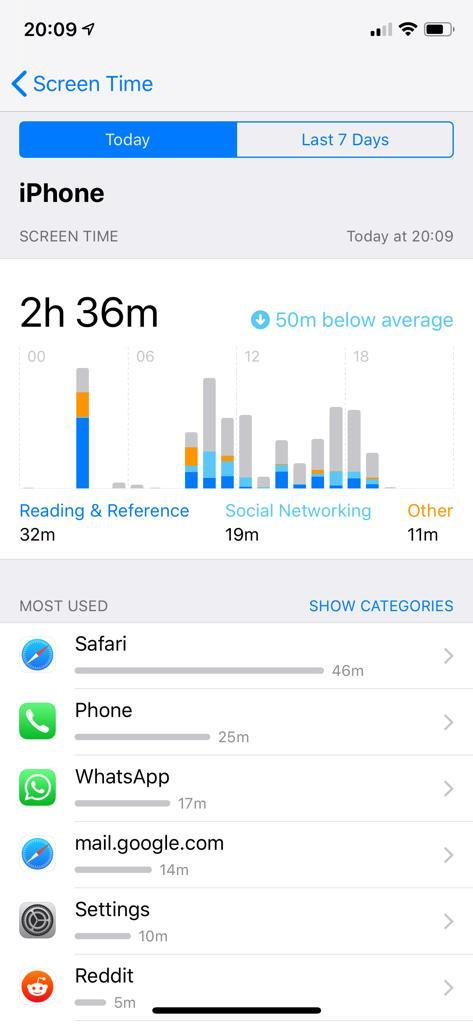
Once added, you can see how much time you have spent on your device today and a breakdown of your usage across categories such as social networking, productivity, and entertainment.
The widget also displays your daily average and gives you a quick glance at your app usage patterns over the past 24 hours. This information can help you better understand how you are spending your time on your device and make more informed decisions about your digital habits.
Additionally, the widget can be customized to show only specific categories or even exclude certain apps from your usage report.
How to Check Your Screen Time on Android Phones?
In addition to the options available on the iPhone’s Screen Time feature, Android phones also offer a variety of options to manage and track your device usage through Digital Wellbeing. The activity dashboard provides a comprehensive overview of your device usage, including how much time you’ve spent on various apps, how many times you’ve unlocked your phone, and how many notifications you’ve received.
You can also set app timers to limit your usage of particular apps, helping you focus on what matters most and avoid time-wasting activities. For example, you can set a timer for social media apps, such as Facebook or Instagram, to 30 minutes per day. Once that limit is reached, the app will be locked until the next day, helping you stick to your goals.

In addition to app timers, Android phones also offer focus mode, which allows you to temporarily pause certain apps to avoid distractions during specific times or activities. For example, you can enable focus mode during work hours to avoid social media notifications and other distractions that can impact your productivity.
The Digital Wellbeing feature also allows you to set a bedtime mode that displays a grayscale version of your phone’s screen, limiting your exposure to blue light, which can disrupt your sleep patterns. You can also enable Do Not Disturb mode during your sleep hours, ensuring you’re not disturbed by notifications or other interruptions while you rest.
By tracking screen time on your Android phone, you can gain insights into your device usage patterns, identify areas that need improvement, and build healthier digital habits. Whether it’s limiting time spent on the phone, focusing on important tasks, or improving your sleep hygiene, using these features can help you lead a more balanced and mindful lifestyle.
Physical Health Effects of Screen Time
Excessive screen time can have various physical health effects, including eye strain, headaches, neck and back pain, obesity, and poor sleep quality. Prolonged exposure to blue light from your screen can also disrupt your circadian rhythm, affecting your sleep patterns.
Mental Health Effects of Screen Time
While smartphones have made our lives easier, extensive usage can negatively affect our mental health. It can lead to increased levels of stress, anxiety, and depression. Spending too much time on your gadgets (iPad, phone, etc.) has also negatively affected our social skills, making it difficult to communicate and develop meaningful relationships.
5 Tips for Managing Screen Time
Here are five quick tips to help you better manage your screen time throughout the day and reduce the harmful effects of devices on your health.
1. Set App Limits: Screen Time allows you to set app limits, thereby limiting the time you spend on particular apps.
2. Schedule Downtime: You can schedule downtime, which will disable all non-essential apps and notifications for a set time period.
3. Take Breaks: Take frequent breaks, look away from your screen, and stretch your body.
4. Get Active: Get active by taking up a hobby or spending time outside.
5. Establish Boundaries: Lastly, establish boundaries for Smartphone usage. Try to keep your phone away from your bedroom or limit its use during meal times.
6. Set your phone to Night Shift. The blue color of the screen affects your health and sleep. You can adjust the color to warmer for the evening time in Settings – Display & Brightness – Night Shift on your iPhone.
Conclusion
In conclusion, screen time is an important feature that helps us monitor our smartphone usage. It is crucial to be mindful of how much time we spend on our devices, as overdoing it can affect us physically and mentally.
With screen time monitoring apps, we can track our smartphone use and develop healthy habits for better physical and mental well-being. By following the tips above, we can use our devices more effectively and be more mindful.
Lastly, if you still cannot seem to get a hold of device usage, consider this little digital detox experiment: Sell your gadgets and see how long you can go without looking at a screen!