Resources · Apple Guide
Find your Mac's serial number & specs.
Everything we need to quote your MacBook, iMac, or Mac sits on one screen. Open "About This Mac" and read off the serial number, processor, and storage.
Step 1
Open About This Mac.
Apple keeps your Mac's key information one click away from the menu bar.
-
1
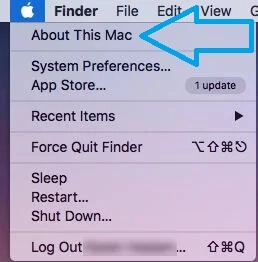
Click the Apple menu
Click the Apple () logo in the top-left corner of your screen.
-
2
Choose "About This Mac"
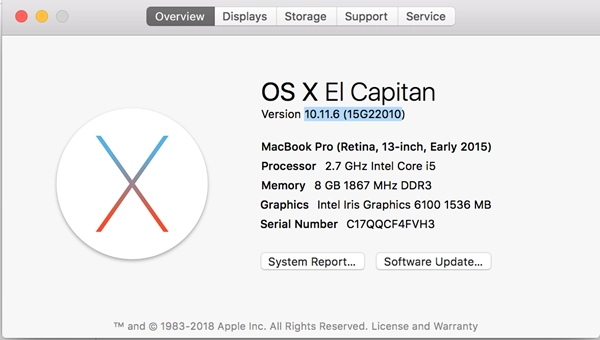
A window opens with an overview of your Mac, including the model, chip or processor, memory, and serial number.
Step 2
Read off your specs.
The overview window lists the three details we need for an accurate quote.
-
1
Serial number
Find the Serial Number line in the overview — it uniquely identifies your exact Mac.
-
2
Processor or chip
Note the Processor (Intel) or Chip (Apple silicon, e.g. M1, M2, M3) shown in the same window.
-
3
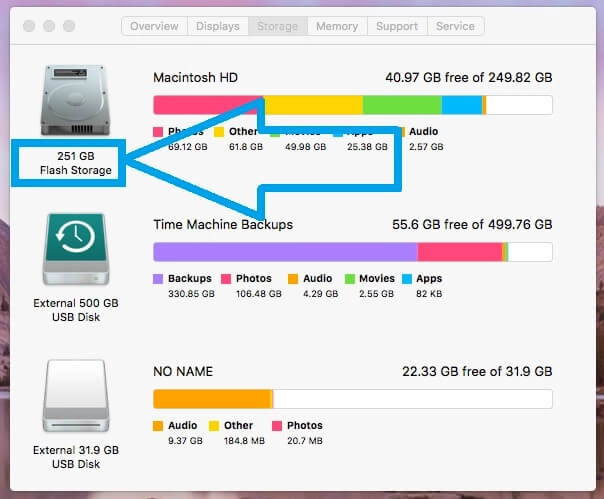
Storage capacity
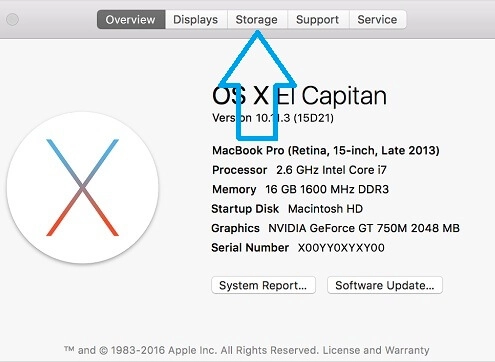
Open the Storage tab to see your total drive capacity — for example 256GB, 512GB, or 1TB.
Still can't find it?
No problem. Contact our team or text us and we'll help you identify your Mac and get you an accurate quote.