Resources · Laptop Guide · Microsoft
Find your Microsoft Surface's model number.
There are four ways to locate your Microsoft Surface's model number. Pick whichever is easiest — then get an instant trade-in quote in seconds.
Method 1
Use the Surface app.
Surface devices ship with a free Surface app from Microsoft that lists your exact model name in one place — the fastest route on a Surface.
-
1
Open the Surface app
Click the Windows icon in the taskbar and type Surface, then open the Surface app. If it isn't installed, grab it free from the Microsoft Store.
-
2
Read your device name
The app opens to a summary screen showing your model — for example Surface Pro 9 or Surface Laptop 5. That's all you need for a quote.
Method 2
Check Windows Settings.
Windows 10 and 11 list both your device name and processor under the About page — no extra app required.
-
1
Open Settings
Open the Settings app (the gear icon) from the Start menu.
-
2
Go to System → About
Navigate to System › About — your Surface model appears under Device specifications, with the Processor listed in the same section.
Method 3
Use System Information.
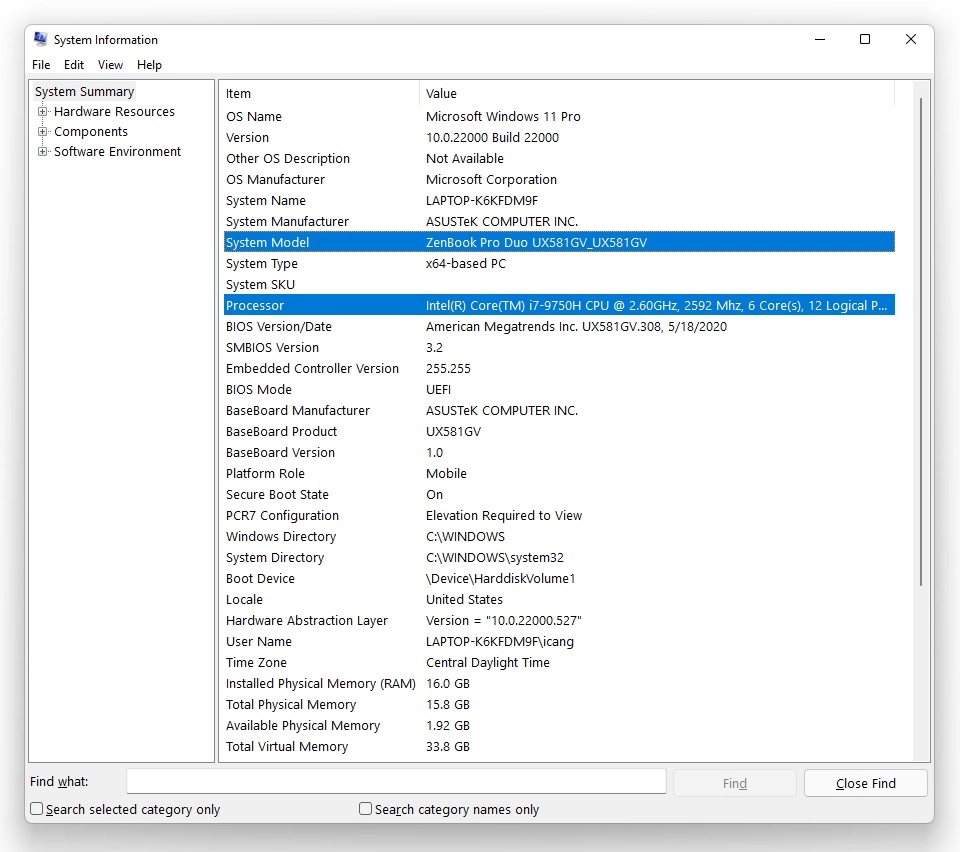
Prefer to do it on-screen? Windows shows both your model number and processor type in two clicks.
-
1
Search for "System Information"
Click the Windows icon in the taskbar and type System Information.
-
2
Open the top result
A window opens with your system summary. The System Model is all you need for a quote, and the Processor is listed in the same window.
Method 4
Check the kickstand or base.
A reliable fallback if Windows won't load. On Surface Pro tablets the label sits beneath the kickstand; on Surface Laptop models it's printed on the underside. Still have the original box? The model is usually printed there too.
-
1
Flip out the kickstand or turn it over
Power off, then on a Surface Pro flip out the kickstand to reveal the label underneath. On a Surface Laptop, close the lid and turn it upside down on a soft surface.
-
2
Read the model and serial
Look for a four-digit Model number — for example Model 1796. You can match that code to a Surface name, or just send it to us along with your serial number.
Still can't find it?
No problem. Contact our team or text us and we'll help you identify your Microsoft Surface and get you an accurate quote.
Found your model?
Get paid for your Microsoft Surface.
Free shipping. Fast payment. No pressure.
Get Your Free Quote