Choosing the Best Lightweight Gaming Laptop in 2026
We compare under-four-pound gaming laptops by measured weight, actual GPU wattage, and tested battery life, using our own testing data alongside published US lab results, and explain what the weight class costs you at resale.
In this article
The short answer:
A lightweight gaming laptop has a discrete GPU and weighs under four pounds. In 2026, that means a 14-inch chassis, an OLED panel, and a graphics chip running at a fraction of the wattage it gets in a chunkier model.
The number that determines how a lightweight gaming laptop actually performs isn't the GPU name on the box. It is total graphics power: the wattage the manufacturer allows that GPU to draw. NVIDIA lets an RTX 5070 Laptop GPU be configured anywhere from 50W to 100W, so two laptops with identical GPU stickers on the palmrest can differ by roughly a factor of two in power budget. Thin chassis sit at the bottom of that band.
The thin-and-light gaming category stopped being a compromise category somewhere around 2024. Those laptops now weigh less than many business ultrabooks, and several models perform rather well at 1440p. But the marketing hasn't caught up with the engineering, and that gap is where buyers lose money.
This guide works through the metrics that matter, using published results from US testing labs rather than manufacturer claims: what these machines actually weigh, what their GPUs are actually allowed to draw, how long they actually run on battery, and what the weight class costs you in upgradeability and resale.
If you are replacing an older computer, read this alongside our breakdown of how mobile graphics cards are ranked — the two topics are inseparable in a thin chassis.
What Constitutes a Lightweight Gaming Laptop?
No certifying body defines the term, so it is worth anchoring it to measured weights rather than marketing nuances. The practical dividing line is four pounds: below it, you carry the notebook without thinking about it; above it, you have to plan around it.
At the far end of the range, Tom’s Hardware measured the Alienware 16 Area-51 at 7.49 pounds and 1.12 inches thick, and its reviewer noted difficulty fitting it into a backpack. That is more than double the weight of the lightest models mentioned in this guide.
| Class | Weight | Typical screen | What you get | What you give up |
|---|---|---|---|---|
| Ultraportable gaming | Under 3.5 lb | 14 in | Fits any bag; runs cool and quiet; usable as a daily driver | Lowest GPU wattage band; soldered RAM is common |
| Light gaming | 3.5–4.5 lb | 14–16 in | Best balance of frame rate and portability in 2026 | Fan noise under sustained load; premium pricing |
| Mainstream gaming | 4.5–6 lb | 15–16 in | Mid-band GPU wattage; usually slotted RAM and two SSD bays | Not something you carry daily |
| Desktop replacement | Over 6 lb | 16–18 in | Top of every GPU’s wattage band; largest cooling systems | Portability, in every practical sense |
Screen size and weight are correlated but not interchangeable. A slim 16-inch laptop can weigh less than a thick 15-inch one, and it will usually have a better-fed GPU than a 14-inch model at the same price. If you want the extreme end of the thinness spectrum specifically, our roundup of the thinnest gaming laptops covers that separately.
Why Do Two Laptops with the Same GPU Perform Differently?
A laptop GPU is not a fixed product. It is a chip plus a power budget, and the manufacturer chooses the budget. NVIDIA publishes a configurable range for each mobile GPU, and the ranges are wide.
| GPU | CUDA cores | Memory | Bus width | TGP range |
|---|---|---|---|---|
| RTX 5070 Laptop GPU | 4,608 | 8 GB GDDR7 | 128-bit | 50–100 W |
| RTX 5070 Ti Laptop GPU | 5,888 | 12 GB GDDR7 | 192-bit | 60–115 W |
| RTX 5080 Laptop GPU | 7,680 | 16 GB GDDR7 | 256-bit | 80–150 W |
| RTX 5090 Laptop GPU | 10,496 | 24 GB GDDR7 | 256-bit | 95–150 W |
Specifications as reported by Tom’s Hardware from NVIDIA’s launch materials. TGP figures exclude Dynamic Boost headroom, which some chassis add on top.
Read the bottom row of that table against the top one. An RTX 5070 Laptop GPU at 50W and an RTX 5070 Laptop GPU at 100W share the same name and price tier in most listings. They are not the same product. As Tom’s Hardware put it when the range was announced, total graphics power is paramount for GPU performance, and manufacturers set it per form factor and chassis.
PCWorld ran into this on the HP Omen Transcend 14, whose RTX 4060 was configured at 65 W. Its reviewer observed that other laptops with the same RTX 4060 may supply more power to the GPU and deliver higher performance—at the cost of heat, fan noise, and power draw. That trade is the entire lightweight category in one sentence.
What to do about it:
- Find the stated maximum graphics power before you buy. Manufacturers publish it on spec pages; reputable reviews list it. A listing that will not state it is telling you something.
- Compare reviews of the specific model, not the GPU. A benchmark chart for an RTX 5070 in a 16-inch chassis does not predict the same chip in a 14-inch one.
- Weigh VRAM as heavily as wattage. The RTX 5070 Laptop GPU ships with 8 GB on a 128-bit bus; the 5070 Ti moves to 12 GB on a 192-bit bus. At 1440p with ray tracing, that gap shows up.
NVIDIA’s Blackwell-generation Max-Q changes — advanced power gating, low-latency sleep, voltage-optimized GDDR7 — are aimed squarely at this category, with the company claiming up to 40% longer battery life. Those gains apply to idle and light load, not to sustained gaming.
Lightweight Gaming Laptops Compared
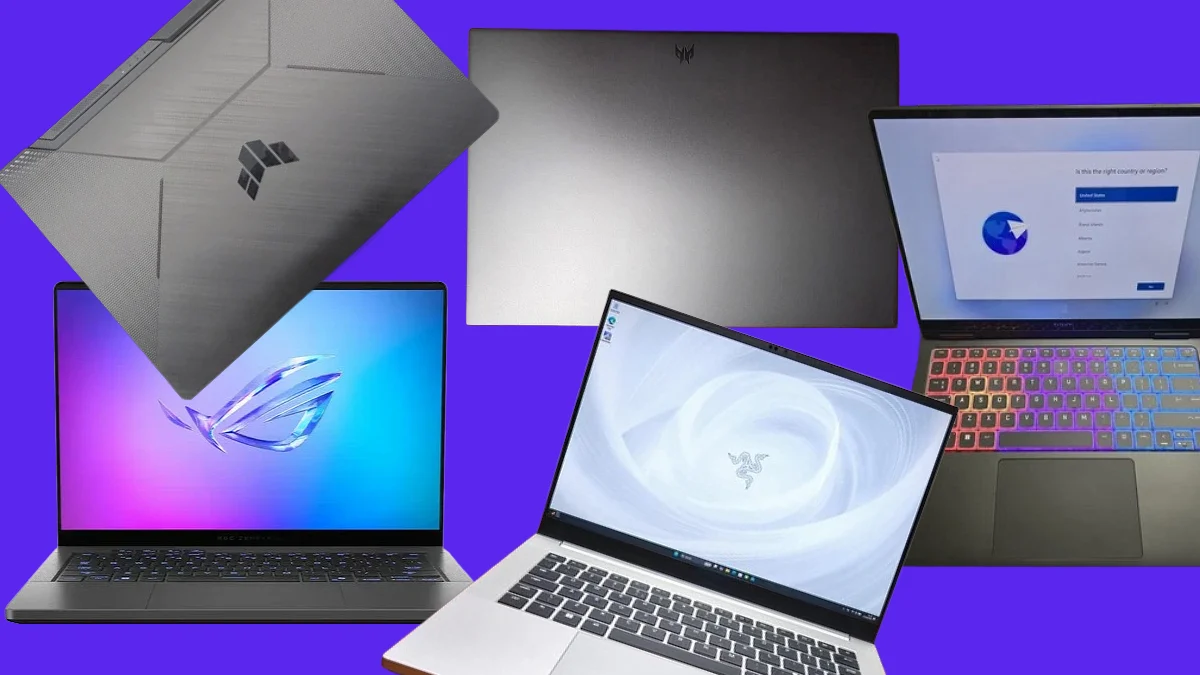
Every weight below is a reviewer’s figure from a US publication, not a manufacturer minimum. Manufacturer weights typically describe the lightest configuration sold, which is rarely the one with the fastest GPU. Razer has confirmed, for instance, that the RTX 5070 build of the Blade 14 is thicker than the RTX 5060 build of the same laptop.
| Model | Weight | Thickness | GPU as reviewed | Display | Reviewed by |
|---|---|---|---|---|---|
| Asus TUF Gaming A14 | 3.22 lb | 0.78 in | RTX 4060 at 100 W | 14 in, 2560 × 1600, 165 Hz IPS-level | Tom’s Hardware |
| Asus ROG Zephyrus G14 (2025) | 3.3 lb | ~0.64 in | Up to RTX 5070 Ti (60–115 W band) | 14 in OLED, 2880 × 1800, 120 Hz | PCWorld |
| Acer Predator Triton 14 AI | 3.5 lb | 0.71 in | RTX 5070 | 14.5 in OLED, 2880 × 1800, 120 Hz touch | Tom’s Hardware |
| Razer Blade 14 (2025) | 3.59 lb | 0.62–0.64 in | RTX 5070 | 14 in OLED, 2880 × 1800, 120 Hz | Tom’s Guide, PCWorld |
| HP Omen Transcend 14 | 3.7 lb | 0.7 in | RTX 4060 at 65 W | 14 in OLED, 2880 × 1800, 120 Hz | Laptop Mag, PCWorld |
| Alienware 16 Area-51 (reference) | 7.49 lb | 1.12 in | RTX 5080 | 16 in, 2560 × 1600, 240 Hz | Tom’s Hardware |
Configurations vary by SKU. Where a review did not publish a sustained GPU wattage, this table cites NVIDIA’s configurable range rather than assuming a value.
Two things stand out. First, the spread across the entire lightweight class is under half a pound—from 3.22 lb to 3.7 lb—while GPU capability across that same spread is not remotely uniform. Second, OLED at 2880 × 1800 has become the category default, which is good for image quality and bad for the GPU, because it is a demanding panel to drive.
The Asus TUF Gaming A14 is the interesting outlier. Tom’s Hardware called it barely bigger or heavier than an ultrabook and noted its 100 W RTX 4060 plays games at moderate settings — a previous-generation GPU near the top of its power band, rather than a current-generation one near the bottom. We looked at that machine on its own terms in our Asus TUF Gaming A14 review.
A note on pricing: we have deliberately left prices out of the table. Laptop pricing through 2026 has been unusually unstable, and any figure quoted here would be wrong within weeks. Our analysis of the 2026 laptop price surge and memory crisis explains why, and it matters if you are timing a purchase.
How Long Do Lightweight Gaming Laptops Last on Battery?
Weight does not determine battery life. Platform efficiency does. Three measured results make the point better than any generalization:
| Model | Weight | Measured runtime | Test method | Source |
|---|---|---|---|---|
| Asus TUF Gaming A14 | 3.22 lb | 10 hr 4 min | Web browsing, streaming, and browser graphics tests | Tom’s Hardware |
| HP Omen Transcend 14 | 3.7 lb | 4 hr 10 min | Laptop Mag continuous web browsing test | Laptop Mag |
| Alienware 16 Area-51 | 7.49 lb | 4 hr 10 min | Web browsing, streaming and browser graphics tests | Tom’s Hardware |
Battery tests are not directly comparable across publications; each lab uses its own workload and brightness target. Rows are grouped by source method above.
A 3.22-pound Asus reached ten hours on Tom’s Hardware’s test while a 3.7-pound HP managed four hours and ten minutes on Laptop Mag’s. The heaviest computer on the list posted the same four hours and ten minutes as the light HP. The variable doing the work is the processor platform and the panel, not the mass.
Gaming on battery is a different question
Expect one to two hours, and expect reduced performance while you get it. Most gaming laptops cut the GPU’s power allocation when unplugged, which means a machine advertising 100 W of graphics power may deliver a fraction of that on battery. Plan to game plugged in; treat the battery figure as a spec for everything else you do with the laptop. If battery life is the deciding factor, measuring your current laptop’s real battery life first will tell you whether an upgrade actually solves your problem.
The practical read: an efficient CPU with switchable graphics gets you a machine that works as an all-day notebook and a competent evening gaming rig. That dual-use case, not raw frame rate, is the honest argument for the whole category.
How to Choose a Lightweight Gaming Laptop?
Start from how you will use the computer on a Tuesday, not from the benchmark you want to win. The category rewards buyers who are honest about the split between gaming and everything else.
| If this is you | Target configuration | Prioritize | Watch out for |
|---|---|---|---|
| You commute daily and game a few evenings a week | Sub-3.5 lb, 14 in, efficient CPU | Battery life and weight over peak frame rate | Check the measured runtime, not the battery capacity |
| You want 1440p at high settings on a portable machine | 3.5–4 lb with RTX 5070 Ti or better | 12 GB VRAM and the upper half of the TGP band | Confirm the stated maximum graphics power in writing |
| You mostly play esports titles | Sub-3.5 lb, high refresh, modest GPU | Refresh rate and input latency | A 165 Hz IPS panel often beats a 120 Hz OLED here |
| You want maximum performance per dollar | Slim 16 in, 4.5–5.5 lb | Cooling headroom and slotted RAM | You are paying a real premium for every half-pound saved |
| You edit video or render as well as game | 14–16 in OLED, 32 GB RAM | Color coverage and sustained CPU performance | Lunar Lake-class chips trade multi-core power for efficiency |
The upgradeability trade
Thin chassis solder things down. RAM is frequently non-replaceable in 14-inch gaming laptops, which makes the memory decision permanent at purchase. Storage is usually the exception — most models keep at least one accessible M.2 slot. Tom’s Hardware notes that CPUs and GPUs are soldered in every gaming laptop regardless of size, so the practical question is whether you can change the RAM and SSD later.
Buy the memory you will need in three years, because you won't add it in year two. For most people in 2026, that means 32GB rather than 16GB, particularly if the machine doubles as a work laptop.
Resale Value: What a Lightweight Gaming Laptop is Worth Later?
The same engineering decisions that make a lightweight gaming laptop appealing also shape its secondhand value. Because RAM is usually soldered, the configuration you buy is the configuration a future buyer inherits. For example, 32GB and 16GB versions of the same laptop carry a meaningful price difference at purchase. On the resale market, however, that price difference is largely negated. It is diluted by the overall condition of a used computer: aluminum unibody chassis and OLED panels show wear more visibly than the plastic and IPS combinations common in heavier models. Whatever appeal larger RAM might have can be negated by screen surface wear or chassis discoloration.
Three factors move the resale price more than anything else:
- Configuration, especially CPU and GPU tier.
- Cosmetic condition, particularly the display, palmrest (keyboard included), and the lid.
- And timing: GPU generations turn over roughly annually, and value drops fastest in the weeks after a successor is announced rather than gradually across the year.
Taking all of this into consideration makes navigating the used electronics resale space a bit challenging. If you feel discouraged by the complexity of hands-on reselling management and would rather get rid of your old gaming rig quickly, we don't blame you. Even we get frustrated at times, having been in the buyback and resale space for over 16 years.
So, we'd like to offer a solution: Gadget Salvation pays for used gaming laptops directly rather than listing them on your behalf, so you get a locked offer and a prepaid shipping label instead of a listing, a negotiation, and marketplace fees. That matters the most because high-value 14-inch notebooks are exactly the listings that often attract chargeback fraud on peer-to-peer marketplaces. You can see the process end to end on our How It Works page, or go straight to a model—Razer, Asus ROG, and MSI all have dedicated pages. If you haven't sold electronics online before, our step-by-step guide to selling a gaming laptop walks you through preparation and data wiping.
Why this matters beyond your wallet
The US Environmental Protection Agency estimates that recycling one million laptops saves the energy equivalent of the electricity used by more than 3,500 US homes in a year. Reselling a working machine sits a step above recycling in that hierarchy: it keeps the device in service, so the energy and materials already spent building it keep doing useful work instead of being reclaimed at a loss.
Before you sell, back up, sign out of every account, and run a factory reset. A laptop that arrives clean and unlocked is inspected and paid for faster.
The Bottom Line
The lightweight gaming laptops category has stopped being a compromise, but it is still a negotiation. You are trading GPU wattage for weight, upgrade paths for thinness, and a real price premium for every half-pound saved against a slim 16-inch notebook. Those are sensible trades when you make them deliberately. Or expensive ones when you make them because a listing showed a familiar GPU sticker, hyped up on Discord, and you stopped there. Find the stated wattage, read a review of the exact model rather than the chip, and buy the memory you will still want in three years. Then, when the need to upgrade eventually arises, remember that the gadget you are replacing is worth the most while it still works: check what it is worth before it becomes junk in your drawer.
Sources:
Every measurement in this article comes from a published US review or a primary source. Where a figure wasn't published, we said so rather than estimate.
- Tom’s Hardware — Best Gaming Laptops 2026 — Measured weights, thickness, display measurements, and battery results for the Acer Predator Triton 14 AI, Asus TUF Gaming A14, and Alienware 16 Area-51.
- Tom’s Hardware — NVIDIA RTX 50-series laptop GPUs — Core counts, memory configurations, and configurable TGP ranges for the RTX 5070, 5070 Ti, 5080, and 5090 Laptop GPUs.
- PCWorld — HP Omen Transcend 14 review — 65 W RTX 4060 configuration and the observation that identically named GPUs at higher wattage deliver higher performance.
- PCWorld — Razer Blade 14 review — Ryzen AI 9 365 and RTX 5070 configuration details for the 2025 Blade 14.
- Tom’s Guide — Razer Blade 14 design and dimensions — 3.59 lb weight, 0.62–0.64 in thickness, 72 Wh battery, and confirmation that the RTX 5070 build is thicker than the RTX 5060 build.
- Laptop Mag — HP Omen Transcend 14 review — Measured 3.7 lb weight and 4:10 battery result.
- PCWorld — Asus ROG Zephyrus G14 review — 3.3 lb measured weight for the 2025 Zephyrus G14.
- US Environmental Protection Agency — Electronics Donation and Recycling — Energy-equivalence figure for recycling one million laptops.
Last reviewed 2026-09-10. Laptop configurations and pricing change frequently; measured figures reflect the review units tested by each publication.