Gigabyte AERO X16 review: a very good laptop wearing the wrong graphics badge
In this article
Gigabyte built a genuinely likable 16-inch creator machine — accurate screen, all-day battery, memory slots you can actually reach — and then throttled its RTX 5070 to 85 watts. Here is what that trade costs you, measured.
The short version
The AERO X16 is the best-behaved laptop in its price bracket and the slowest RTX 5070 in it. Buy it if you want a quiet, well-built, upgradeable 16-inch machine that edits sRGB video, compiles code and runs a full workday off the charger. Skip it if the graphics card in the spec sheet is the reason you are shopping.
What Gigabyte actually built
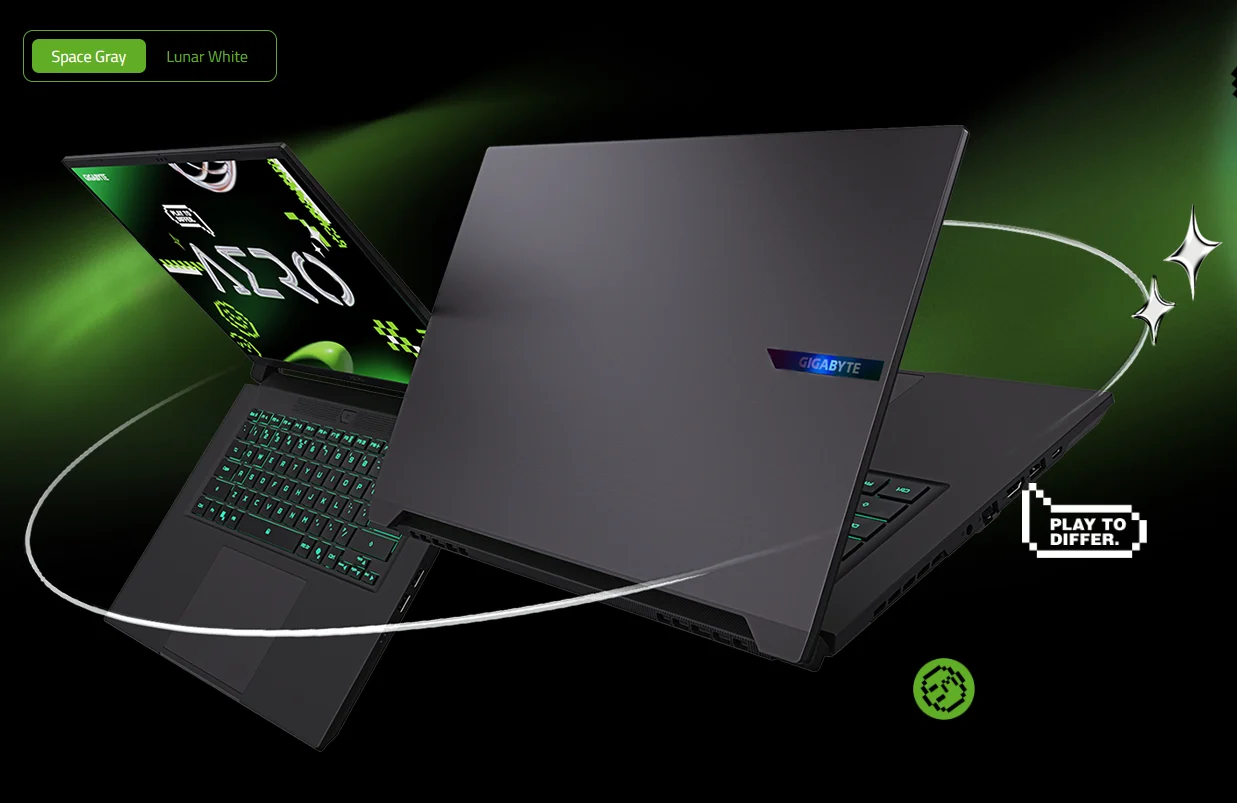
The AERO line has been around since 2016, and it has always aimed at the same awkward middle ground: enough graphics power to game on, restrained enough to open in a meeting without apologizing. The AERO X16 is the clearest expression of that idea Gigabyte has shipped. No lightbar, no engraved venting, no oversized logo. The lid carries a small reflective mark, and the bottom bezel says AERO. That is the entire visual argument.
Underneath sits AMD’s Ryzen AI 7 350, an eight-core Krackan Point part combining four full Zen 5 cores with four density-optimized Zen 5c cores, paired with an NVIDIA GeForce RTX 5070 Laptop GPU and 8 GB of GDDR7. Because of the AMD silicon and its 50-TOPS neural processor, the machine qualifies as a Copilot+ PC, which brings on-device features like live captions and webcam studio effects. Whether you care about that is a separate question, and one we have picked apart in our look at whether a Copilot+ PC is worth buying in 2026.
The 85-watt problem
Every review of this laptop eventually comes down to the same number, so let us start there. A laptop graphics chip is not a fixed product. NVIDIA sells the silicon, and each manufacturer chooses how much power to feed it. The RTX 5070 Laptop GPU is configurable across roughly 50 W to 100 W of base total graphics power, and Dynamic Boost can shift up to another 15 W across from the processor when the CPU is not busy. That puts the ceiling at 115 W.
Gigabyte set the AERO X16 to 85 W maximum graphics power. Notebookcheck’s measurements confirm that figure already includes the 15 W of Dynamic Boost, which means the base budget is closer to 70 W — roughly 30% below what the chip is rated to take.
This is not a defect. It is a design decision, and in a chassis that is 19.9 mm thick and weighs under two kilograms, it is defensible. Power has to go somewhere, and somewhere means heat, fan noise, and a thicker deck. Gigabyte chose portability. The problem is that the box still says RTX 5070, and buyers reasonably read that badge as a performance promise. Reviewing the machine for PC Gamer, Zak Storey found the AERO X16 delivered an average performance improvement of just 5.7% over Gigabyte’s own cheaper Gaming A16 with an RTX 5060 — a machine sitting one rung down the ladder for about $100 less. If you want a broader primer on why two laptops with identical GPU names can perform nothing alike, our guide to choosing a laptop graphics card covers the mechanics in detail.
Gaming performance, measured

Tom’s Hardware tested the AERO X16 against three sensibly chosen rivals: the Acer Predator Triton 14 AI at 110 W, the Framework Laptop 16 at 100 W, and the budget-focused MSI Katana 17 HX at 115 W. Every one of them runs the same RTX 5070 with more power available. Here is 1080p, which is where the CPU and GPU are both relatively unconstrained.
Higher is better.
Read that as a pattern rather than a series of individual losses. The AERO X16 beats the Acer consistently, and consistently trails the Framework and the MSI. The gap to the Framework — 15 W of extra GPU power and nothing else meaningfully different in the graphics stack — runs between 17% and 20% depending on the title. That is close to a linear return on wattage, which tells you the chip is power-limited rather than thermally or architecturally constrained.
Native resolution is the more honest test, because 2560 × 1600 is what you will actually be looking at.
Cyberpunk 2077 at the Ray Tracing Ultra preset is unplayable at native resolution on every machine here, which says more about the preset than the laptops. Everything else lands in usable territory: Far Cry 6 at 70 fps and Borderlands 3 at 61 fps are perfectly good numbers for a 165 Hz panel, and DLSS 4 upscaling — where the AERO X16’s Blackwell tensor hardware genuinely helps — buys back headroom in supported titles.
The bigger long-term concern is not wattage but memory. Eight gigabytes of VRAM was already tight when this generation launched, and newer titles at 1600p with high-resolution texture packs will run into it before the GPU itself runs out of steam. Notebookcheck flagged this at review time, and it has aged into the machine’s most consequential limitation.
Sustained load and thermals
Where the AERO X16 redeems itself is consistency. Across fifteen consecutive loops of the Metro Exodus stress test, Tom’s Hardware recorded an average of 80.86 fps with a standard deviation of just 0.22 fps between runs. That is a remarkably flat line. The processor held an average of 2.76 GHz and the GPU averaged 1,928 MHz throughout, with internal temperatures settling at 58 °C on the CPU and 68 °C on the GPU.
Surface temperatures stayed civil too: 71 °F at the touchpad, 95 °F between the G and H keys, and 114 °F on the underside toward the rear vent. Notebookcheck was less charitable about acoustics, listing loud fans under gaming load as a genuine drawback, so expect the cooling system to make itself heard even if the chassis stays comfortable. The upside of a conservative power limit is that nothing here throttles — you get the same frame rate in hour three that you got in minute one.
Processor and everyday work
This is where the machine stops apologizing. The Ryzen AI 7 350 runs a 70 W sustained power limit, and Gigabyte lets it hold that limit indefinitely. Notebookcheck’s Cinebench R15 multi-core loop showed no measurable decay across runs, and unplugging the laptop cost only about 6% of multi-core performance — a far smaller battery penalty than most gaming laptops impose.
In practical terms: the AERO X16 posted the highest Geekbench 6 single-core score in its comparison group at 2,916 points and led multi-core at 14,074, ahead of the Core i7-14650HX in the MSI and, more surprisingly, ahead of the identically specified Framework Laptop 16. It transcoded a 4K clip to 1080p in HandBrake in 3 minutes 54 seconds, roughly 24 seconds faster than the Framework and more than two minutes quicker than the Acer.
Storage is the weak link. The 1 TB Kingston OM8PGP41024Q is a PCIe 4.0 drive that PC Gamer called the slowest it had tested to date, at close to half the throughput of the drive in Gigabyte’s own cheaper Gaming A16. Tom’s Hardware measured 1,480 MB/s on a 25 GB file transfer — mid-pack rather than catastrophic, but well short of the Framework’s 1,725 MB/s. Given the second empty M.2 2280 slot, this is a fixable complaint, which is more than can be said for most laptop shortcomings.
The display
Gigabyte fitted a matte 16-inch IPS panel at 2560 × 1600 and 165 Hz. Reviewers disagreed sharply, and the disagreement is instructive. Tom’s Hardware measured 369 nits and 78.5% DCI-P3 coverage on its unit and called the panel the minimum acceptable for the class. Notebookcheck measured 403 nits and 96.1% sRGB on its unit and rated the same panel highly. PC Gamer described it as crisp and color-accurate.
Both sets of numbers can be true — panel supply varies between production runs, and Gigabyte’s own spec sheet notes that display components may differ between units. What every reviewer agrees on is the shape of the compromise: this is an accurate sRGB screen with a matte finish, not a wide-gamut showpiece.
If your work lives in sRGB — web, YouTube delivery, most photography workflows — the out-of-the-box ΔE of 1.3 is genuinely excellent and better than plenty of laptops that cost more. If you grade in DCI-P3 or print from Adobe RGB, look elsewhere. And if you have spent time with an OLED panel recently, the 1,234:1 contrast ratio will feel flat no matter what the color measurements say. The absence of PWM dimming is worth noting for anyone who gets headaches from flickering backlights.
Build, ports and the parts you can replace
Reviewers split on materials — Tom’s Hardware describes an aluminum exterior, Notebookcheck a plastic construction — but both rate the result as sturdy, with tight panel gaps and a lid that opens one-handed. The dark grey finish shows fingerprints; a lunar white option does not.
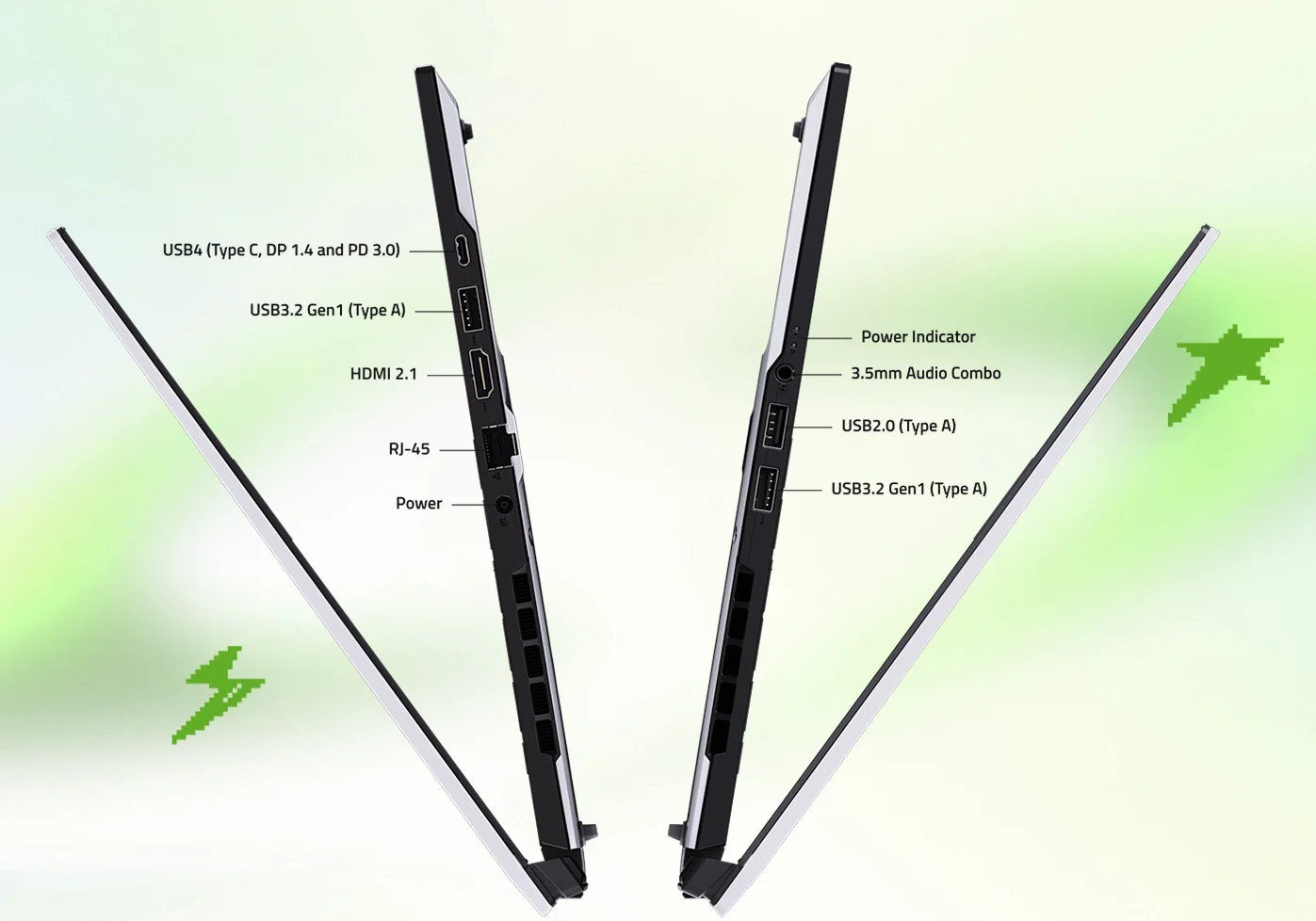
Port selection is complete and oddly dated. You get USB4 with DisplayPort and 100 W Power Delivery, HDMI 2.1, Gigabit Ethernet, two USB-A 3.2 Gen 1 ports, and a headphone jack. You also get a USB-A 2.0 port and a Realtek Wi-Fi 6E card in a machine that lists above $1,500, which is difficult to defend in 2026. The barrel-connector power input is a further reminder that this design was finalized a while ago. Placement is the other irritation: nearly every port sits toward the front of each side, so cables end up in the path of your mouse hand.
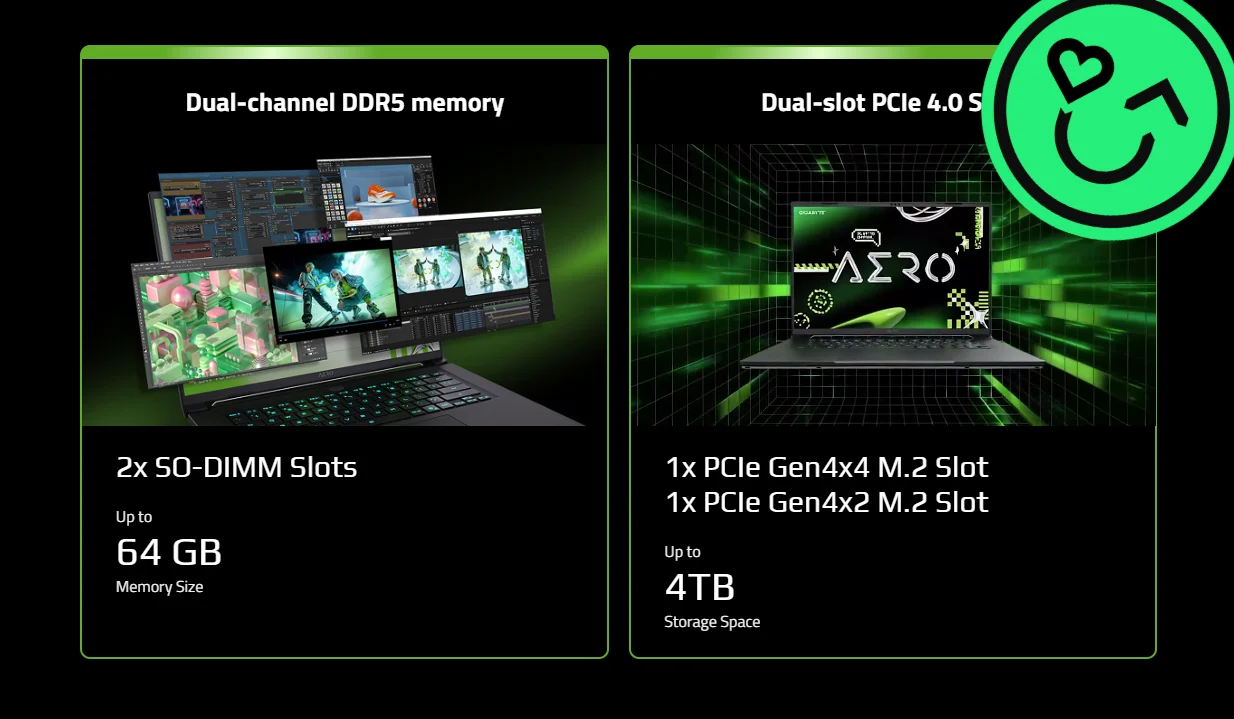
Serviceability is the compensation, and it is substantial. Ten identical Phillips screws release the bottom panel, revealing two SO-DIMM slots supporting up to 64 GB, two M.2 2280 drive bays, a socketed M.2 2230 wireless card, and a removable battery. That combination is close to extinct in thin 16-inch laptops, and it is the single strongest argument for this machine over a sealed competitor. A slow SSD and an aging Wi-Fi card are both afternoon projects rather than permanent conditions. We have looked at the broader Gigabyte range and how it holds up in our assessment of Gigabyte laptops.
Keyboard, touchpad, speakers and webcam
The keyboard is a highlight: 1.7 mm of travel, a defined actuation point and enough cushioning that long typing sessions do not punish your fingertips. Tom’s Hardware’s reviewer hit 126 words per minute at 99% accuracy, close to a personal best. The touchpad is large at 13.3 × 9 cm, slightly recessed, and glides well, though its mechanical click is loud. Backlighting is single-zone RGB with three brightness levels — unremarkable for a gaming laptop, forgivable for a creator machine.
Audio is the low point. Two 2 W speakers produce muddy, bass-light sound with poor instrument separation, and the Dolby Atmos presets do not rescue it. Volume is barely adequate for a quiet room. The 1080p webcam is similarly average, with soft detail in anything less than good lighting, though noise reduction is well tuned and the infrared sensor handles Windows Hello reliably. There is no privacy shutter.
Battery life
The 76 Wh battery, combined with the efficient AMD platform and a modest GPU power limit, produces the machine’s most persuasive number.
Nine hours and thirteen minutes of mixed browsing, streaming, and light OpenGL work at 150 nits is a genuine workday, and roughly an hour more than either the Framework Laptop 16 or the Acer Predator Triton 14 AI managed on the same test. Notebookcheck independently recorded a little over eight hours. Set expectations properly, though: PC Gamer measured 109 minutes on a substantially heavier load, and gaming unplugged will land somewhere in that region. This is a laptop that lasts all day doing laptop things, not a laptop that games all day.
Who should buy it
Buy the AERO X16 if the graphics card is a bonus rather than the point. It is quiet under normal use, it types beautifully, it holds an accurate sRGB image, it survives a full workday unplugged, and you can open it with a screwdriver and improve it. For a developer, a student, an sRGB video editor, or anyone who games in the evenings without needing maximum frame rates, that package is coherent and hard to fault at current street prices, which have drifted well below the original $1,899 asking price of the top configuration.
Do not buy it at full retail if you are shopping on frames per second. Cheaper machines with higher-wattage versions of the same GPU will beat it, sometimes decisively, and Gigabyte’s own less expensive models come uncomfortably close. The 8 GB frame buffer also means this configuration will age faster than a 12 GB alternative. If maximum gaming throughput is the goal, our roundup of gaming laptops under $1,000 is a better starting point.
Resale value
Two things drive what an AERO X16 will be worth in a year. The first is the 8 GB frame buffer: as games and creative applications push past that ceiling, demand on the secondhand market softens faster than it does for 12 GB and 16 GB machines. The second is the upgrade path, which works in your favor — a unit with the RAM filled out and a faster drive fitted presents better to a buyer than a stock one, and both upgrades are cheap. Keep the original box, the 150 W adapter, and any receipts, because complete listings consistently clear higher than bare ones.
The practical lesson is the same one that applies to every discrete-GPU laptop: depreciation is steepest in the first eighteen months, and waiting for the next NVIDIA generation to launch before selling costs you real money. If you are weighing an upgrade, Gadget Salvation buys Gigabyte laptops directly — you answer a few questions about condition, get a locked quote, ship with a prepaid label, and get paid once the unit is inspected, with no listings, no lowball messages, and no meeting strangers in parking lots. We also handle the full gaming laptop category. For a deeper look at what moves the number, see our breakdown of the factors that determine laptop resale value and our step-by-step guide to selling a gaming laptop.
Verdict
Gigabyte got almost everything right and then set one number too low. The AERO X16 is well made, quiet, accurate, repairable, and unusually long-lived off the charger. Its RTX 5070 runs at 85 watts, and no amount of engineering elsewhere hides what that costs in frame rates against rivals running the same chip 15 to 30 watts harder.
Judge it as a creator laptop that games, and it is a strong recommendation at street prices. Judge it as a gaming laptop, and it is beaten by machines that cost less — including one of Gigabyte’s own.
Frequently asked questions
Is the Gigabyte AERO X16 good for gaming?
Yes, with a caveat about resolution. At 1920 × 1080 it clears 60 fps comfortably in everything short of heavy ray tracing, and at its native 2560 × 1600 it holds playable frame rates in most titles with settings turned down a notch. What it will not do is match other RTX 5070 laptops, because its GPU runs at a lower power limit than theirs. If frame rates per dollar are your only metric, thicker machines beat it.
Why is the RTX 5070 in the AERO X16 slower than in other laptops?
Because laptop GPUs are sold as a chip plus a power budget, and manufacturers choose the budget. The RTX 5070 Laptop can be configured from about 50 W to 100 W of base graphics power, with up to 15 W more shifted from the CPU by Dynamic Boost. Gigabyte set the AERO X16 to 85 W total. Competing machines run 100 W, 110 W and 115 W. Same silicon, less power, fewer frames.
Can you upgrade the RAM and storage in the AERO X16?
Yes, and this is one of its real strengths. Behind ten identical Phillips screws you get two SO-DIMM memory slots supporting up to 64 GB, two M.2 2280 drive bays, a replaceable M.2 2230 wireless card and a removable battery. Very few thin 16-inch machines are this open.
How is the battery life?
Strong for a machine with a discrete GPU. On Tom’s Hardware’s mixed test of web browsing, streaming and OpenGL work at 150 nits, it ran 9 hours 13 minutes — about an hour longer than the Framework Laptop 16 and the Acer Predator Triton 14 AI. Gaming unplugged is a different story and will drain it in around two hours.
Is the display good enough for photo and video editing?
For sRGB work, yes. It covers 96.1% of sRGB and arrives calibrated to an average ΔE of 1.3, which is better than most laptops in this class manage. For anything mastered in DCI-P3 or Adobe RGB, no — coverage sits near 69% and 71% respectively, so saturated colours will clip.
What is the AERO X16 worth on the used market?
It depends on configuration, cosmetic condition and how much of the original warranty is left. Gaming laptops with 8 GB of video memory have been depreciating faster than 12 GB and 16 GB machines as game requirements climb, so selling sooner protects more value. The fastest way to find out what yours is worth today is to run it through the Gadget Salvation quote tool, which returns a locked price before you ship anything.
Sources
- Charles Jefferies, “Gigabyte Aero X16 Review”, Tom’s Hardware, March 26, 2026 — gaming, productivity, battery, thermal and display measurements.
- Zak Storey, “Gigabyte Aero X16”, PC Gamer, November 7, 2025 — RTX 5070 versus RTX 5060 comparison and storage testing.
- Andreas Osthoff, “Gigabyte Aero X16 Review”, Notebookcheck, May 26, 2025 — calibrated display measurements, sustained CPU load testing, and full specifications.
- GeForce RTX 50 Series Laptops, NVIDIA — RTX 5070 Laptop GPU configurable power range and Dynamic Boost.