Microsoft Surface Studio 2 vs. Apple iMac
Microsoft Surface Studio 2 vs. Apple iMac: What makes a better computer for video rendering, gaming, and everyday use? Both are all-in-one computers, but…
In this article
Microsoft Surface Studio 2 vs. Apple iMac: What makes a better computer for video rendering, gaming, and everyday use?
Both are all-in-one computers, but they are very different in many ways. So, let’s figure out which is definitely better than the other together.
Microsoft Surface Studio 2 vs. Apple iMac: Key Similarities
The apparent advantage of the all-in-one system is its plug-and-play feature compared to a rather complex PC rig. Both the Microsoft Surface Studio 2 and the iMac are beautiful, slim-profile, compact computers with outstanding hardware.
Each device comes with Bluetooth accessories (a keyboard and a mouse). And they also sport a somewhat similar aluminum chassis design.
So, to sum it up, both the Apple iMac and the Microsoft Surface Studio have:
- All-in-one feature
- Slim aluminum body
- Basic accessories included.
Although, to the last point, you can get a trackpad for an iMac to replace your mouse. At the same time, the Surface Studio 2 supports the Surface Pen, a feature that all iMacs lack.
Microsoft Surface Studio 2 vs. Apple iMac: Key Differences
While these two computers have much in common, they are also quite different in many respects. We wouldn’t even go as far as to say that the Microsoft Surface Studio line is a direct competitor to Apple desktops. We think the Studio competes with major Windows PC brands, namely workstations from Lenovo, HP, etc.
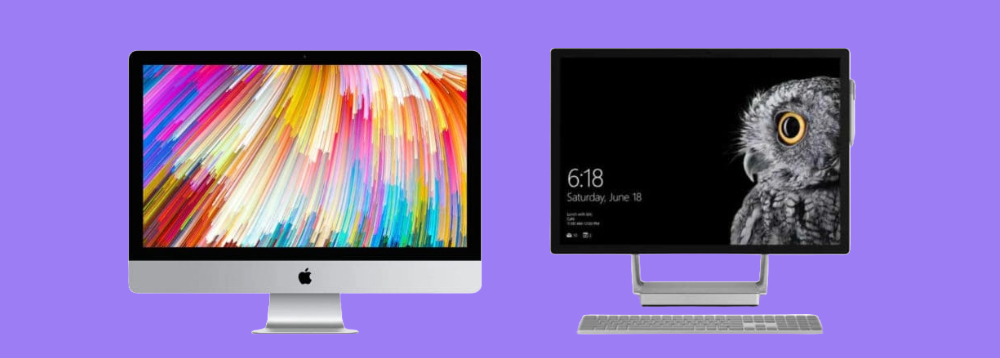
Still, the 27-inch iMac line and the Surface Studio 2 models are roughly the same size and offer equally capable hardware.
The significant difference we’d like to point out right off the bat is that the Surface Pro 2 has a touchscreen display. The beautifully crisp 28-inch multitouch screen can turn your PC into a giant tablet for digital drawing, drafting — you name it. At this time, we (like many Apple users) are puzzled that none of Apple’s computers still have a touchscreen, even in 2023.
Another key difference is the number of I/O ports. The Microsoft Surface Studio offers four USB-A ports; it has an SD card reader, an Ethernet port, and a headphone jack. On the other hand, the iMac sports four more Thunderbolt 3 ports, in addition to four USB-A ports, the audio jack, the SDXC slot, and the Ethernet port. Not having Thunderbolt 3 can be an issue for many Studio users.
However, the most essential dissimilarity that will determine whether you choose the iMac or the Surface Studio is the software. Yes, it always comes down to that one question: Mac (macOS) or PC (Windows)?
We recommend prioritizing your professional needs when picking between these two vastly different platforms. For example, a programmer might want to choose the iMac over the Surface Studio 2. Yet, a graphic designer can benefit from Microsoft’s touchscreen feature and pen support.
So, let’s sum those main differences up again:
- macOS vs. Windows
- iMac does not have a touchscreen
- iMac has more I/O ports and supports Thunderbolt 3
Related: Mac vs PC Laptop: Which is Best for You?
Performance Rundown
Both the Surface Studio and the iMac Pro are packed with high-end components and cater primarily to the professional world, making them the top choice for corporate computer equipment. Let’s take a closer look at the main hardware markers.
Screen
Size-wise, the 28-inch Surface Pro 2/2+ is very comparable to the 27-inch iMac. But, as we already mentioned, the one huge advantage of the Microsoft computer is its 10-point multitouch feature. The adjustable PixelSense monitor with 13.5 million pixels makes digital drawing comparable to sketching on paper.
At the same time, the Apple iMac offers 5120 × 2880 5K resolution, a 60 Hz refresh rate, and 500 nits of brightness.
Graphics
The base Apple iMac 2017 model comes with the AMD Radeon Pro Vega 56 graphics card with 8GB of VRAM and is configurable to the Vega 64 or 64X with 16GB of video memory.
Microsoft decided to stick with NVIDIA, however. Its Surface Studio 2 has a GeForce GTX 980M 4GB GPU, and the newer Surface 2+ model is configurable with a GTX 1060 6GB GDDR5 or GTX 1070 8GB GDDR5 GPU.
Despite those differences, both desktops are very capable of video rendering, running power-hungry editing programs, and gaming.
Processor
The latest Surface Studio 2+ model is powered by the 11th-generation Intel Core i7 processor, which is a bit underwhelming, given that we are already on the 13th generation. Still, the quad-core i7-11370H is sufficient to keep up with your daily workflow, video editing, and even playing AAA titles.
The Surface Pro 2 model has an even older Intel Core i7-7820HQ processor with no variations.
Apple’s 27-inch iMac Pro tops the Surface Studio in that regard, as it comes with a more powerful Intel Xeon CPU that can be configured with 8, 10, or even 18 cores. And the latest 24-inch model sports Apple’s own M1 chip.
Thermals
Both brands applied new and somewhat unorthodox approaches to heat management. The Microsoft Studio 2 contains all its hardware in the screen base (bottom). As a result, the display panel is not affected by heat. At the same time, the computer’s profile is too narrow to accommodate a decent-sized heatsink fan; therefore, you might still experience significant overheating.
On the other hand, Apple added a large dual-fan heatsink to its iMac Pro, which keeps the device cool despite its demanding hardware requirements.
Microsoft Surface Studio 2 vs. Apple iMac: The Cost
The lower-end Surface Studio is significantly cheaper than the iMac Pro (in fact, $2000 less at the time of its release). Still, needless to say, both computers are very expensive, even today, given their outdated hardware.
Because of their exclusivity, both the Apple iMac and the Microsoft Surface Studio carry significant resale value over time. When you take an investment plunge with either of these models, at least you’ll have peace of mind knowing that you can still sell your computer and recover some cash worth way down the line.
In Conclusion
As you can see, the Microsoft Surface Studio 2 vs. Apple iMac choice ultimately comes down to the following: whether you prefer macOS or Windows, whether you need a touchscreen feature, and whether you are prepared to spend thousands of dollars on a desktop. Both lines have their advantages, but also lack features at the same time. Sometimes, we wish it were possible to mesh the iMac M1 computing capabilities with the Surface Studio touchscreen display. Wouldn’t that be a perfect all-in-one desktop?