MacBook Activation Lock: How to Check It, Clear It, and Sell a Locked Mac
Activation Lock is the most common reason a MacBook sale stalls at inspection. Here is how to check for it in under a minute, clear it properly, and what to do when the Mac is locked to a former employer rather than to you.

In this article
Activation Lock is the reason a MacBook sale stalls more often than cracked screens, dead batteries and bad trackpads combined. It is also the one problem that is completely free to fix — and almost impossible to fix once the laptop is in a courier's hands and you have moved on to the new machine.
The mechanics are worth understanding before you wipe anything, because the step most people get wrong is the order. Erasing the drive first and signing out of iCloud second leaves the Mac locked. It takes about two minutes to do correctly and a week of emails to undo.
Does your MacBook support Activation Lock at all?
Not every Mac does, and this is the first thing to establish.
Activation Lock on a Mac requires either Apple silicon or the Apple T2 Security Chip. In practice that means:
| Your MacBook | Activation Lock |
|---|---|
| Any Apple silicon model (M1 and later) | Yes |
| Intel models from roughly 2018 onward, with the T2 chip | Yes |
| Intel models predating the T2 chip | No |
An older Intel MacBook without a T2 chip cannot be Activation Locked. You should still sign out of iCloud and erase it, for your own privacy and because a firmware password will block a buyer just as effectively — but the specific lock this article is about does not apply to it.
A note on checking, because a lot of older guides still get this wrong: there is
no public Apple page that will tell you the Activation Lock status of a serial
number. Apple retired that lookup tool years ago. Anything presenting itself as
an official Activation Lock checker today is not one.
The check that takes thirty seconds
If you can still log in to the Mac, open System Settings, click your name at the top, then iCloud, and look at Find My Mac. If it is on, the Mac is Activation Locked to your Apple Account. On macOS 12 and earlier this lives in System Preferences under Apple ID; on recent versions the top item is labelled Apple Account rather than Apple ID. The path differs slightly by version, but it is always your account, then iCloud, then Find My.
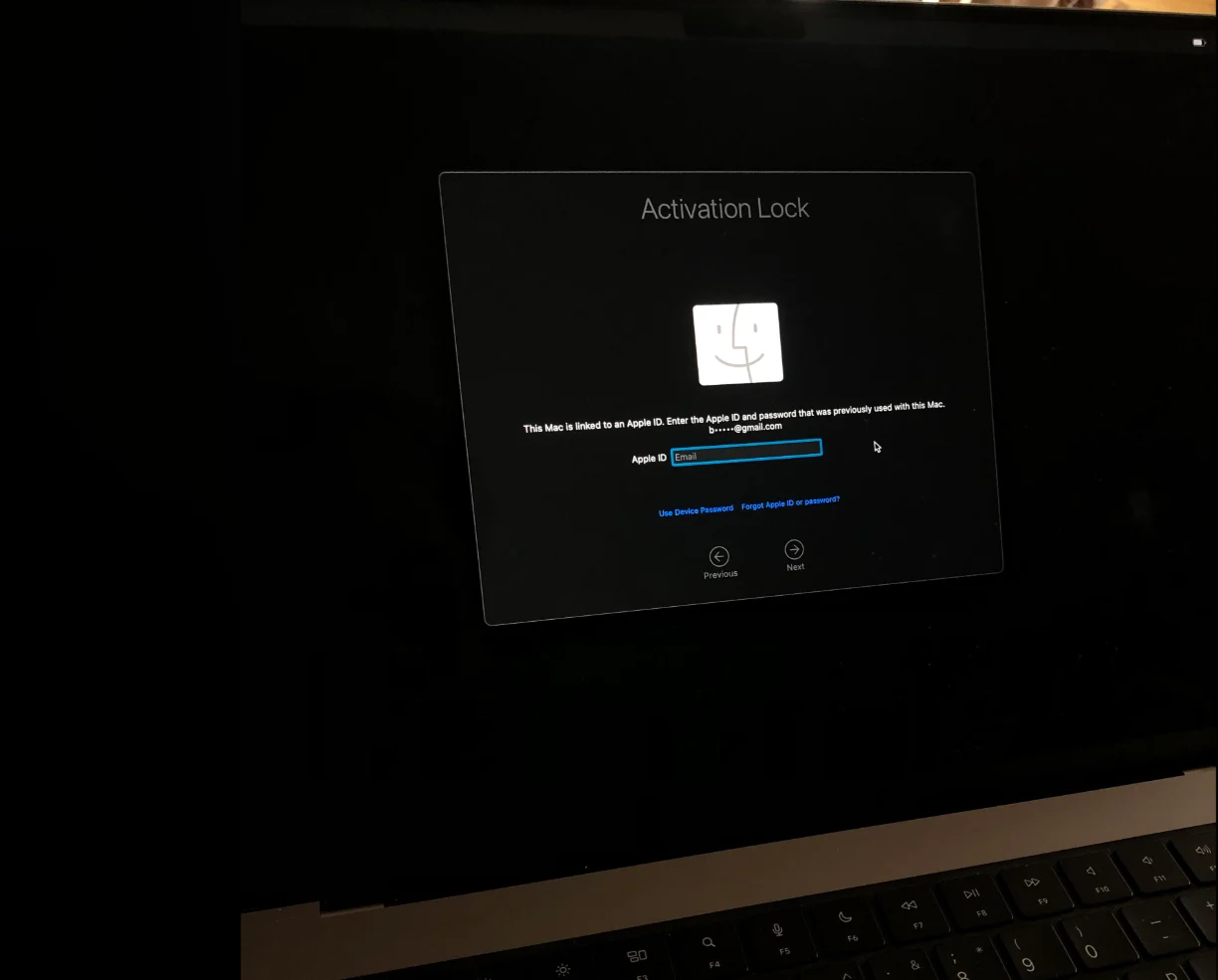
If the Mac is already erased and sitting at the setup screen, it tells you directly: a wiped but unlocked Mac asks you to choose a language and a Wi-Fi network. A locked one asks for an Apple Account email and password before it will let you past.
Clearing it the right way, in the right order
Sign out before you erase. This is the whole game.
On an Apple silicon or T2 Mac running macOS Monterey or later, one option does both steps correctly and in sequence: System Settings, General, Transfer or Reset, then Erase All Content and Settings. It signs you out of your Apple Account, clears Activation Lock, erases your data and leaves the Mac at the setup screen — the state a buyer needs it in.
On an older Intel Mac, or an older version of macOS where that option does not exist, do it manually and in this order:
- System Settings or System Preferences, your account, then Sign Out of iCloud entirely.
- Restart holding Command-R to reach Recovery.
- Use Disk Utility to erase the internal volume.
- Reinstall macOS and shut down at the setup screen without creating an account.
Reverse steps 1 and 2 on a T2 or Apple silicon Mac and you get the outcome this article exists to prevent: a freshly erased laptop that boots to a password prompt for an account you have already stopped thinking about. The erase does not clear the lock. Only signing out does.
Our Apple model and serial guide covers finding the model and serial if you need them for a quote first, and how to wipe a MacBook Pro to sell it walks through the erase itself in more detail.
You already shipped it
This is recoverable, and you do not need the Mac in front of you.
Go to iCloud.com, sign in, open Find My, and select the Mac under All Devices. Choose Erase This Device, and once that is requested, Remove From Account. Removing it from the account is the step that actually clears Activation Lock for whoever has the laptop next — erasing alone does not.
If the Mac is powered off or offline, the request queues and applies the next time it connects, which it will do when it is unboxed and plugged in. The same logic applies to iPhones, and we have a walkthrough of turning off Find My iPhone after you have shipped it.
The ex-work MacBook, which is a different lock entirely
Here is the case that trips up both sellers and the guides they read.
If your MacBook came from an employer, a school or a university, it may be enrolled in Mobile Device Management through Apple Business Manager or Apple School Manager. That is not Activation Lock, it just looks like it. The tell appears during setup: a managed Mac shows a Remote Management screen saying the device is supervised by an organisation.
| Activation Lock | Remote Management (MDM) | |
|---|---|---|
| Tied to | Your personal Apple Account | The organisation's device enrolment |
| What clears it | Signing out, or Remove From Account | Only the organisation releasing the serial |
| Can you fix it yourself? | Yes, in minutes | No |
| Survives an erase? | Yes | Yes, and it re-applies at setup |
No Apple Account password will clear an MDM enrolment, because it was never your account that applied it. Only the organisation's IT administrator can release the serial number from their management console. If the company no longer exists or IT will not help, the Mac cannot be set up as an ordinary personal computer, and no honest buyer will price it as one.
If you are an employer sitting on a batch of managed Macs rather than an individual with one, release them in your MDM console before shipping, and come through corporate buyback or school buyback rather than the consumer flow.
Can you sell a MacBook that is still locked?
As a working computer, no. A locked Mac cannot be set up, which means it cannot be resold, which means nobody can pay working-condition money for it. Any price you are quoted on a still-locked Mac is a parts price, and it is a fraction of what the same laptop is worth unlocked.
Treat a buyer who offers full value for an Activation Locked MacBook without asking any questions as a warning sign rather than a bargain. Either they have not checked and the offer will be revised later, or they are not planning to resell it legitimately.
The good news is the asymmetry runs in your favour: clearing the lock is free and takes minutes, and it is the difference between a parts price and a real one. If you want to see what the unlocked number looks like, get an instant offer on your MacBook and compare.
What happens when a locked MacBook reaches us
We will tell you, rather than quietly dropping the offer.
Every MacBook is inspected on arrival, and a Mac that cannot be set up cannot be graded as working. At that point the quote is revised and you decide what happens next: accept the revised offer, or have the laptop shipped back to you free of charge. Nothing is resold or recycled while that decision is yours to make. In most cases the faster route is simply to clear the lock remotely from iCloud.com using the steps above, and the original quote stands.
Separately, and regardless of what you did before shipping, every device we receive is securely erased during processing — the details are in our data erasure protocols. Signing out of iCloud is about unlocking the hardware, not about protecting your data from us.
Frequently asked questions
How do I know if my MacBook is Activation Locked?
If you can log in, open System Settings, click your name, choose iCloud and check whether Find My Mac is on. If it is on, the Mac is locked to your Apple Account. If the Mac is already erased, start it up: a locked Mac asks for an Apple Account email and password at the setup screen, while an unlocked one asks you to pick a language and a network. There is no official Apple website that checks Activation Lock status by serial number, so ignore any site claiming to be one.
Does erasing my MacBook remove Activation Lock?
Not on its own, and this is the most common mistake. On an Apple silicon or T2 Mac, erasing the drive from Recovery leaves Activation Lock in place — the lock is held by the security chip, not the disk. You have to sign out of your Apple Account, either beforehand or by using Erase All Content and Settings, which performs the sign-out and the erase together in the correct order.
Can I remove Activation Lock after I have already shipped my MacBook?
Yes. Sign in at iCloud.com, open Find My, select the Mac under All Devices, choose Erase This Device and then Remove From Account. Remove From Account is the step that clears the lock. If the Mac is offline the request is queued and applies as soon as it is powered on and connected.
Why does my MacBook say it is managed by an organisation?
That is Mobile Device Management, not Activation Lock, and it means the Mac is still enrolled in a former employer's or school's device management. Only that organisation can release it, and no Apple Account password or erase will remove it. If you bought the laptop secondhand in this state, the seller should not have sold it as an ordinary personal Mac.
Will you still buy a MacBook that is Activation Locked?
A locked Mac cannot be set up or resold as a working computer, so it cannot be graded as one. If one arrives locked we contact you with a revised offer and you choose between accepting it and a free return — and in most cases clearing the lock remotely from iCloud.com takes a few minutes and keeps your original quote intact.